
Markdown Copier Chrome 插件, crx 扩展下载
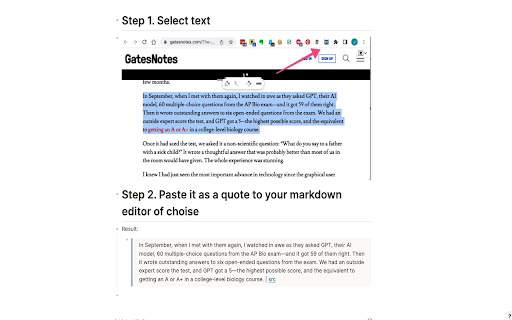
Copy selected text and page URL in Markdown format
Markdown Copier is a Chrome extension designed to help you copy selected text and page URLs in markdown format for use with note-taking and knowledge management apps like Obsidian and Logseq.
Key Features
Two Modes of Operation: The extension has two modes:
Text is selected: Copies the selected text and the page URL in markdown format;
No text selected: Copies only the page URL in markdown format.
Current Tab Only: The extension works exclusively for the current tab, ensuring that you have control over the content you want to copy.
Customisable Output Format: Tailor the output format to your preferences. The default format is "> [selected text] | [src]([current page URL])", but you can modify it to suit your needs.
Keyboard Shortcut Support: Assign a custom keyboard shortcut to activate the extension without clicking the icon. To set up a shortcut, visit `chrome://extensions/shortcuts` in your browser and configure a key combination. 'Cmd + M' is a suggested one.
Seamless Integration with Obsidian and Logseq: Effortlessly copy and paste markdown-formatted links into Obsidian and Logseq, enhancing your research and note-taking experience.
Secure and Lightweight: The extension is developed with security in mind, ensuring no unnecessary permissions or security vulnerabilities are present.
| 分类 | 📝工作流程与规划 |
| 插件标识 | gpkpbiplojopnhjhdnhecopokjoaagph |
| 平台 | Chrome |
| 评分 |
★★★★☆
4.2
|
| 评分人数 | 134 |
| 插件主页 | https://chromewebstore.google.com/detail/markdown-copier/gpkpbiplojopnhjhdnhecopokjoaagph |
| 版本号 | 1.0 |
| 大小 | 32.75KiB |
| 官网下载次数 | 139 |
| 下载地址 | |
| 更新时间 | 2023-11-22 00:00:00 |
CRX扩展文件安装方法
第1步: 打开Chrome浏览器的扩展程序
第2步:
在地址栏输入: chrome://extensions/
第3步: 开启右上角的【开发者模式】
第4步: 重启Chrome浏览器 (重要操作)
第5步: 重新打开扩展程序管理界面
第6步: 将下载的crx文件直接拖入页面完成安装
注意:请确保使用最新版本的Chrome浏览器
同类插件推荐
Markdown Copier
Copy selected text and page URL in Markdown format

HTML to Markdown
Translate a selected HTML text to equivalent markd

Copy Rich Link
Copy the page title and URL as rich text.Copy the

Copy as Markdown
Browser extension to copy hyperlinks, images, and