
Smartling Context Capture Chrome 插件, crx 扩展下载
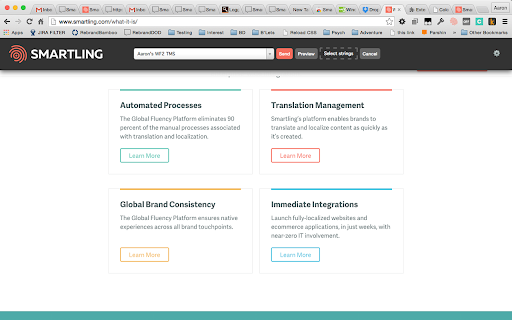
Provide visual context for translators using the Smartling platform.
The Smartling Context Capture extension helps users create visual context for strings uploaded into the Smartling system for translation.
When you click the button added to your toolbar, the extension captures the HTML page (including the images and css) from the browser in the state you see at the moment you clicked. This allows you to capture interactive states of the page that are displayed only by user actions, for example, a modal dialog.
The HTML snapshot is submitted to the Smartling system where we associate it with any string that appear inside the page. When translators come to translate these pages, they are shown the snapshot to help inform their translation and to test the appearance of their translations in the actual HTML in which it will ultimately be displayed to end users.
| 分类 | 💻开发者工具 |
| 插件标识 | hbckdcedbkhjfeomlikdkgkfcibkeofi |
| 平台 | Chrome |
| 评分 |
★★★★★
5
|
| 评分人数 | 1 |
| 插件主页 | https://chromewebstore.google.com/detail/smartling-context-capture/hbckdcedbkhjfeomlikdkgkfcibkeofi |
| 版本号 | 5.0.1 |
| 大小 | 4.91MiB |
| 官网下载次数 | 1000 |
| 下载地址 | |
| 更新时间 | 2024-08-23 00:00:00 |
CRX扩展文件安装方法
第1步: 打开Chrome浏览器的扩展程序
第2步:
在地址栏输入: chrome://extensions/
第3步: 开启右上角的【开发者模式】
第4步: 重启Chrome浏览器 (重要操作)
第5步: 重新打开扩展程序管理界面
第6步: 将下载的crx文件直接拖入页面完成安装
注意:请确保使用最新版本的Chrome浏览器
同类插件推荐

SAGE2 Screen Capture
This chrome extension enables screensharing to SAG
PseudoLocalizer
PseudoLocalize an HTML web page.Update includes ma

Sitecore Extensions
Small improvements which will make your work with

Eyfo
Github Package Finder - Chrome extensionFind githu

Locale Switcher
Lets you quickly switch the browser locale to test

StaticShot - Screenshot Capture & Annotate
Capture pages, edit and upload images to Static.md

Conversion.com's Optimizely Chrome Extension
This extension allows you to learn information abo
Smartling Context Capture
Provide visual context for translators using the S

ApSIC Xbench Extension for Polyglot
Instantly run QA with ApSIC Xbench on Polyglot fil

Smartling GDN String Status
Allows you to see all of the strings that are curr

Clockwise: AI-Powered Scheduling Assistant
The #1 AI calendar assistant for Google CalendarCl

Design Mode
Allows you to make temporary edits to any page.New