
SnipCSS Chrome 插件, crx 扩展下载
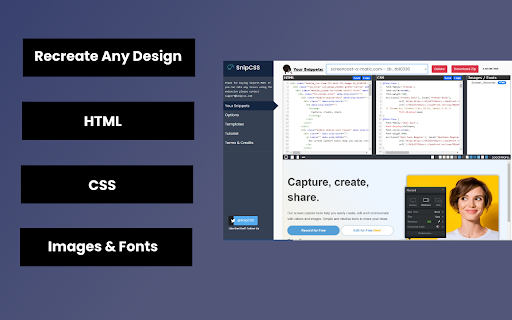
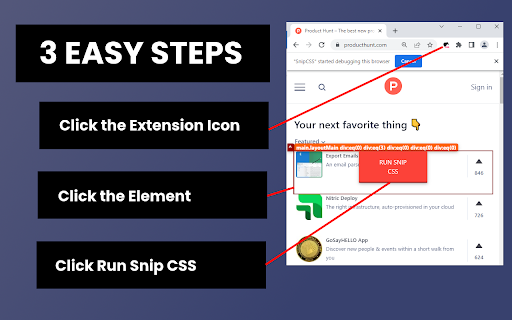

Extract the CSS/HTML for any element on any page, only take the styles you want
SnipCSS extracts all CSS styles associated with any portion of a webpage. It works on all websites, and after a few clicks you get the CSS, HTML and Images associated with the section of the website you are trying to recreate.
ANY COOL DESIGN YOU SEE ON THE WEB CAN BE YOUR PERSONAL TEMPLATE FOR QUICK PROTOTYPING!
========================================
If you tried to do the same by copying/pasting by hand it would probably take 20 minutes, but with SnipCSS you can select and get all styles including ones with media queries in under a minute. I even use it on sections of websites I created myself in other projects, so I can get a quick reusable HTML/CSS component to plug into my new project.
Unlike other CSS extractor extensions that use "Computed Styles", SnipCSS uses the Chrome DevTools protocol. Just like when you use devtools you see a list of associated styles, SnipCSS reconstructs that list for each element in the subtree of the DOM snippet.
All images, fonts and everything else needed for the design is downloaded, and you can easily export all the files into a zip file.
PRO VERSION LAUNCHED!
========================================
Get CSS from multiple resolutions or multiple elements using the Pro Version! Also advanced features like no-conflict CSS classes, scoping, removing unnecessary attributes/classes, and creating a sub-selection of items have been added for Pro members.
Version 1.7.0 adds the ability to turn your snippets into React/Vue templates by using ChatGPT.
The template version of a snippet injects Lorem Ipsum data into the html so copyrighted images/text are automatically replaced. You can also use Stable Diffusion to replace images in the HTML. Generative AI features require a free SnipCSS account.
TAILWIND CONVERSION!
========================================
Version 1.9.0 adds the ability to convert all HTML/CSS into valid Tailwind, including with media queries and pseudo selectors.
Just visit SnipCSS.com and sign up if you're interested in unlocking these advanced features.
| 分类 | 💻开发者工具 |
| 插件标识 | hbdnoadcmapfbngbodpppofgagiclicf |
| 平台 | Chrome |
| 评分 |
★★★★☆
4.1
|
| 评分人数 | 151 |
| 插件主页 | https://chromewebstore.google.com/detail/snipcss/hbdnoadcmapfbngbodpppofgagiclicf |
| 版本号 | 1.9.8 |
| 大小 | 13.12MiB |
| 官网下载次数 | 20000 |
| 下载地址 | |
| 更新时间 | 2024-12-05 00:00:00 |
CRX扩展文件安装方法
第1步: 打开Chrome浏览器的扩展程序
第2步:
在地址栏输入: chrome://extensions/
第3步: 开启右上角的【开发者模式】
第4步: 重启Chrome浏览器 (重要操作)
第5步: 重新打开扩展程序管理界面
第6步: 将下载的crx文件直接拖入页面完成安装
注意:请确保使用最新版本的Chrome浏览器
同类插件推荐

SnappySnippet
Easily extract CSS and HTML from selected element.
CSS Used
Get all css rules used by the selected DOM and its
css scanner
The fastest, cleanest free css property viewer.The

eXtract Snippet
Extract HTML/CSS snippets from websites. Inspect a
SnipCSS
Extract the CSS/HTML for any element on any page,
Html Scan
Scan and copy text, html markup on any websitesHtm

Hoverify: All-in-one extension for web developers
Master web development with an all-in-one browser

Web Design Pirate
Fast and easy way to copy web components, HTML wid

CSS Peeper
Extract CSS and build beautiful styleguides.? No m
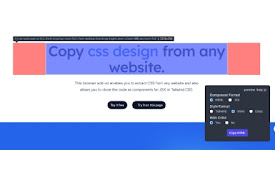
CopyCss - Copy css scan from any website.
Copy css scan from any website.Copy css design fro

CSS Scan
快速检查复制CSS计算值此系统需支付得到许可才能使用它。您可以通过https://getcsssca

PageRip (HTML + CSS Extract)
Rip HTML + CSS snippets from any element on any we

DivMagic - 复制样式
将任何网页中的元素复制为可重用的 Web 组件。获取 HTML、CSS、React、JSX 或 Ta