
Copy Text with URL Chrome 插件, crx 扩展下载
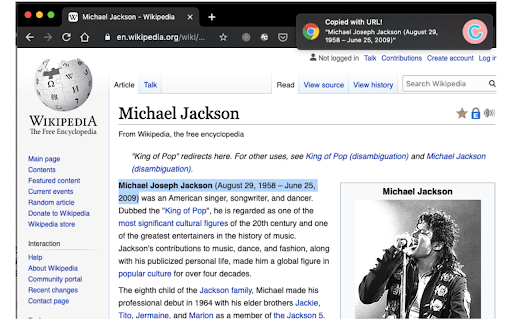
Copy current selected text and current URL
Copy selected text and current URL jointly!
- Plain copy mode
You can fire the action by either clicking the extension icon or pressing "Ctrl+Shift+C". The format is like below.
selected_text
http://curent_url
- Markdown copy mode
You can fire the action by pressing "Ctrl+Shift+M". The format is like below.
[selected_text](http://current_url)
You can also customize the shortcuts in your extension page. Perhaps, some shortcuts don't work in your environment. Please try the other ones.
- chrome://extensions/shortcuts
This extension is publicly available.
https://github.com/jojonki/copy-text-with-url
| 分类 | ♿无障碍访问 |
| 插件标识 | hbeifjjbjnpnpnffifmojplmlcjakhii |
| 平台 | Chrome |
| 评分 |
★★★★☆
4.2
|
| 评分人数 | 17 |
| 插件主页 | https://chromewebstore.google.com/detail/copy-text-with-url/hbeifjjbjnpnpnffifmojplmlcjakhii |
| 版本号 | 2.0 |
| 大小 | 531KiB |
| 官网下载次数 | 92 |
| 下载地址 | |
| 更新时间 | 2022-12-29 00:00:00 |
CRX扩展文件安装方法
第1步: 打开Chrome浏览器的扩展程序
第2步:
在地址栏输入: chrome://extensions/
第3步: 开启右上角的【开发者模式】
第4步: 重启Chrome浏览器 (重要操作)
第5步: 重新打开扩展程序管理界面
第6步: 将下载的crx文件直接拖入页面完成安装
注意:请确保使用最新版本的Chrome浏览器
同类插件推荐
Copy Text with URL
Copy current selected text and current URLCopy sel

CopyTabTitleUrl
Copy the title and URL to the clipboard.You can cu

Copy Rich Link
Copy the page title and URL as rich text.Copy the

Web Content Copier
Copy headings and paragraphs from the current webp