
Download Link Copier Chrome 插件, crx 扩展下载
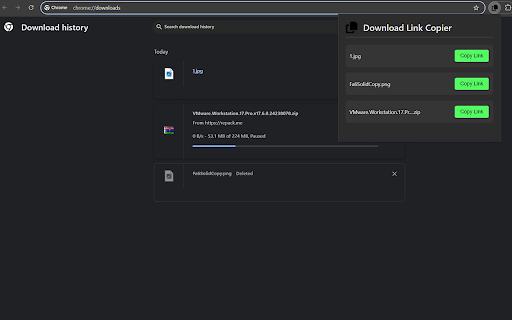

View and copy download links from the extension popup
Download Link Copier is a simple yet powerful Chrome extension designed for users who frequently need to share or re-download files.
Key features:
View a list of recently downloaded files
Copy download links with one click
Supports light and dark themes, automatically adapting to your Chrome theme settings
Clean and intuitive user interface, easy to use
Whether you're sharing files with colleagues or need to re-download files on different devices, Download Link Copier makes the process simple and quick. Just click on the extension icon to see your download history and easily copy the download link for any file.
Safe and reliable: We value your privacy. This extension only accesses necessary download information and does not collect or store any personal data.
Install Download Link Copier now and experience more convenient download link management!
| 分类 | 🛠️工具 |
| 插件标识 | hcbhopdccjigebaecapaelgakppbfnbc |
| 平台 | Chrome |
| 评分 |
★★★★☆
4.5
|
| 评分人数 | 55 |
| 插件主页 | https://chromewebstore.google.com/detail/download-link-copier/hcbhopdccjigebaecapaelgakppbfnbc |
| 版本号 | 1.0 |
| 大小 | 11.3KiB |
| 官网下载次数 | 162 |
| 下载地址 | |
| 更新时间 | 2024-09-26 00:00:00 |
CRX扩展文件安装方法
第1步: 打开Chrome浏览器的扩展程序
第2步:
在地址栏输入: chrome://extensions/
第3步: 开启右上角的【开发者模式】
第4步: 重启Chrome浏览器 (重要操作)
第5步: 重新打开扩展程序管理界面
第6步: 将下载的crx文件直接拖入页面完成安装
注意:请确保使用最新版本的Chrome浏览器


