
OSHIStamp:YouTube 视频时间戳创建工具 Chrome 插件, crx 扩展下载



YouTube视频:时间戳创建工具
YouTube Video: Timestamp Creation Assistant Tool
This is a free tool that assists with creating timestamps for YouTube videos.
With intuitive controls, you can easily create and edit timestamps, and for advanced users, quick tasks using keyboard shortcuts are also available.
It helps make your fan activities more enjoyable and convenient. Please make use of it!
Main Features:
・Add Timestamps
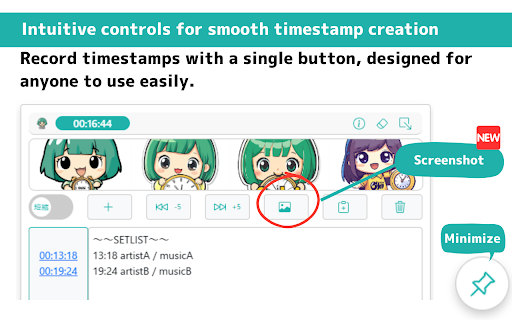
Simply click the "+" button while watching the video to add the current timestamp.
・Change Timestamp Format
You can choose from the following two formats for the timestamps:
- Short format (e.g., 2:30, 1:45:15)
- Full format (e.g., 00:02:30, 01:45:15)
※ When adjusting by ±1 second using shortcuts, the selected format will be applied.
・Jump to Timestamp
Simply click on a timestamp link to jump to that specific point in the video.
・Fast Forward / Rewind
Skip forward 5 seconds with a button or 1 second with a keyboard shortcut.
・Video Screenshot
You can download a screenshot of the video in "PNG format."
・Copy Timestamp
Copy the created timestamp to the clipboard with one click.
・Check Playback Time
View the real-time playback time of the video on-screen.
・Auto-Save Feature
Timestamps are automatically saved to local storage, ensuring no data loss during work.
・Display Fan Images
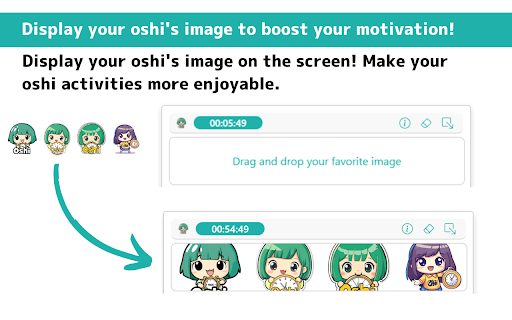
Upload your favorite image to display on the screen, boosting motivation for your fan activities!
(Supported size: 530px × 70px, formats: JPG, PNG, SVG)
・Minimize Feature
Minimize the screen to the bottom right when not in use.
Keyboard Shortcuts:
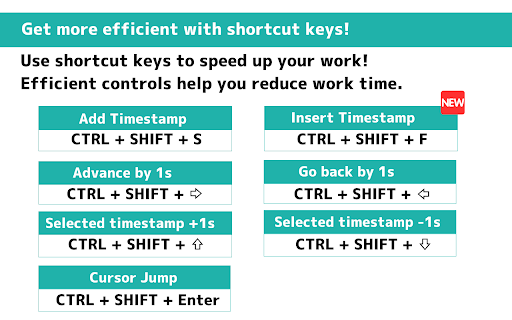
・CTRL + SHIFT + S: Add a timestamp
・CTRL + SHIFT + F: Insert a timestamp
・CTRL + SHIFT + →: Skip forward 1 second
・CTRL + SHIFT + ←: Skip backward 1 second
・CTRL + SHIFT + ↑: Adjust selected timestamp(s) forward by 1 second (multiple selections allowed)
・CTRL + SHIFT + ↓: Adjust selected timestamp(s) backward by 1 second (multiple selections allowed)
・CTRL + SHIFT + Enter: Jump to the timestamp time of the line with the cursor
Changelog:
・Version 1.0.0: Initial release.
・Version 1.1.0: Added localization support. (de, en, en_US, es, fr, ja, pt_BR, zh_CN)
・Version 1.2.0: Added localization support. (ru)
・Version 1.3.0: Added vertical and horizontal resizing functionality, adjusted screen size, and added a space after timestamps.
・Version 1.4.0: Added the shortcut key "Ctrl + Shift + F" for inserting timestamps.
・Version 1.5.0: Added localization support. (id, it, nl, vi)
・Version 1.6.0: Fixed horizontal scrollbar jitter.
・Version 1.7.0: Changed the addition, insertion, and adjustment of short format timestamps from h:m:ss to h:mm:ss format.
・Version 1.8.0: Added the video screenshot feature, and changed the width of the fan image size: 430px → 530px
Privacy and Data Management:
This tool does not collect any user data. All data is saved locally and managed securely.
Disclaimer:
The developer is not responsible for any loss or damage caused by the use of this tool. Please use it at your own risk.
| 分类 | ⚙️功能性 |
| 插件标识 | hcpfgbneeldjlkbfhbmidhiadhdoddjk |
| 平台 | Chrome |
| 评分 |
★★★★☆
4
|
| 评分人数 | 660 |
| 插件主页 | https://chromewebstore.google.com/detail/oshistamp%EF%BC%9Ayoutube-视频时间戳创建/hcpfgbneeldjlkbfhbmidhiadhdoddjk |
| 版本号 | 1.8.0 |
| 大小 | 133KiB |
| 官网下载次数 | 86 |
| 下载地址 | |
| 更新时间 | 2025-02-21 00:00:00 |
CRX扩展文件安装方法
第1步: 打开Chrome浏览器的扩展程序
第2步:
在地址栏输入: chrome://extensions/
第3步: 开启右上角的【开发者模式】
第4步: 重启Chrome浏览器 (重要操作)
第5步: 重新打开扩展程序管理界面
第6步: 将下载的crx文件直接拖入页面完成安装
注意:请确保使用最新版本的Chrome浏览器


