
Web Aliases Chrome 插件, crx 扩展下载
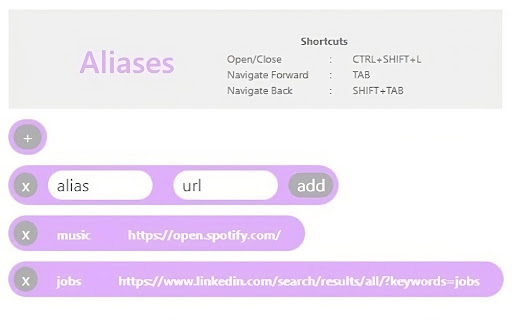

Web Aliases is a Chrome extension that allows users to create nicknames for websites so that users don't have to remember long URLs.
Web Aliases allows you to create nicknames for your common web page and access them via the search bar.
Simply add a new alias and URL pair.
Type in your newly added alias into your browsers address bar and you will be redirected to your saved URL.
Using Web Aliases means you do not need to use your mouse to navigate to saved websites.
The CTRL + T chrome shortcut lets you open a new browser tab and simply type in your saved alias and you are the at your saved web address, no mouse touches needed.
Web aliases also provides shortcuts so aliases can be added solely through use of the keyboard.
Keyboard Shortcuts
Default - Opening/Closing the extension : CTRL+SHIFT+L
Mac - Opening/Closing the extension : COMMAND+SHIFT+L
Navigating Forward : TAB
Navigating Back : SHIFT+TAB
Adding/Removing Aliases : ENTER
| 分类 | 🛠️工具 |
| 插件标识 | hdempabimjppagbgpiglikbobneoegmp |
| 平台 | Chrome |
| 评分 |
★★★★☆
4.3
|
| 评分人数 | 574 |
| 插件主页 | https://chromewebstore.google.com/detail/web-aliases/hdempabimjppagbgpiglikbobneoegmp |
| 版本号 | 1.0 |
| 大小 | 2.8MiB |
| 官网下载次数 | 372 |
| 下载地址 | |
| 更新时间 | 2023-07-26 00:00:00 |
CRX扩展文件安装方法
第1步: 打开Chrome浏览器的扩展程序
第2步:
在地址栏输入: chrome://extensions/
第3步: 开启右上角的【开发者模式】
第4步: 重启Chrome浏览器 (重要操作)
第5步: 重新打开扩展程序管理界面
第6步: 将下载的crx文件直接拖入页面完成安装
注意:请确保使用最新版本的Chrome浏览器
同类插件推荐
Web Aliases
Web Aliases is a Chrome extension that allows user

Tiny URL Shortener
Simple Extension to convert long URLs or Links of

Export Tabs as Text File
Chrome Tabs extension saves active tab URLs with a

Copy All URLs (Free)
A simple Chrome extension to copy URLs of all open