
No Shorts Youtube Chrome 插件, crx 扩展下载
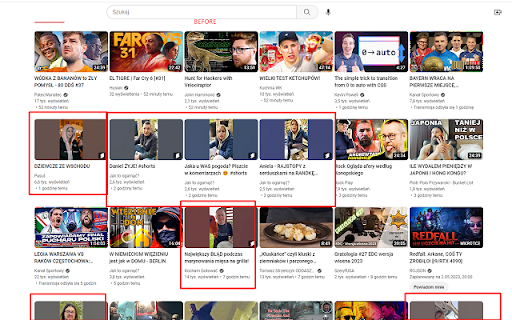
Filter out shorts from YouTube videos
The YouTube Filter Extension is a handy tool that allows you to filter out videos on YouTube that contain "short" in the URL. This means that you can easily hide all the Shorts videos from your YouTube feed, without having to manually scroll through them.
The extension works by injecting a small JavaScript code into the YouTube page that automatically hides any video thumbnail with "short" in the URL. This feature can be toggled on and off using a convenient button in your browser's toolbar. The button color indicates whether the filter is currently active or not, so you can easily tell at a glance.
With the YouTube Filter Extension, you can enjoy a more streamlined YouTube experience that is free from unwanted Shorts videos. Give it a try and see how much easier it is to find the content that you want!
| 分类 | ♿无障碍访问 |
| 插件标识 | hdkdogokoklgcjcdkklodcgbbhalhibh |
| 平台 | Chrome |
| 评分 |
★★★★☆
4.6
|
| 评分人数 | 763 |
| 插件主页 | https://chromewebstore.google.com/detail/no-shorts-youtube/hdkdogokoklgcjcdkklodcgbbhalhibh |
| 版本号 | 1.0 |
| 大小 | 3.76KiB |
| 官网下载次数 | 100 |
| 下载地址 | |
| 更新时间 | 2023-05-04 00:00:00 |
CRX扩展文件安装方法
第1步: 打开Chrome浏览器的扩展程序
第2步:
在地址栏输入: chrome://extensions/
第3步: 开启右上角的【开发者模式】
第4步: 重启Chrome浏览器 (重要操作)
第5步: 重新打开扩展程序管理界面
第6步: 将下载的crx文件直接拖入页面完成安装
注意:请确保使用最新版本的Chrome浏览器
同类插件推荐
No Shorts Youtube
Filter out shorts from YouTube videosThe YouTube F

No YouTube Shorts
Removes all Shorts from YouTubeTired of the YouTub

Shorts Remover for YouTube™ Subscriptions
A slim extension that removes YouTube™ Shorts from

No more shorts
Removes shorts and shorts section from your youtub