
Gmail Summary Chrome 插件, crx 扩展下载
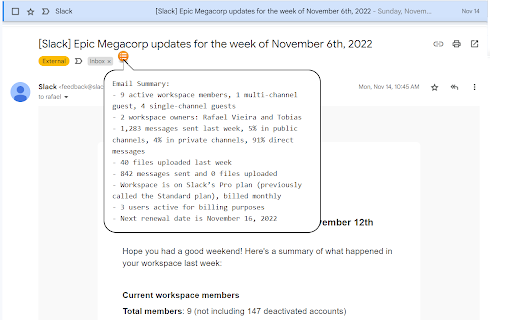

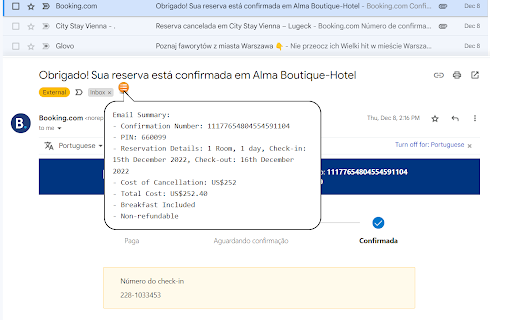
Get email summaries with a single hover.
Say goodbye to endless scrolling through long emails!
Our Chrome extension is here to save you time and streamline your inbox. With just a quick hover over the icon, you can get a summarized version of any email - in any language!
It's like magic!
Try it now for free and revolutionize the way you manage your emails.
You'll wonder how you ever lived without it.
And the best part? It's totally free!
PS.: It also summarize your emails that are not in english!
| 分类 | 📝工作流程与规划 |
| 插件标识 | heplmghemcnjfdlabpcjcldanblnmkbb |
| 平台 | Chrome |
| 评分 |
★★★★☆
4.4
|
| 评分人数 | 605 |
| 插件主页 | https://chromewebstore.google.com/detail/gmail-summary/heplmghemcnjfdlabpcjcldanblnmkbb |
| 版本号 | 1.0 |
| 大小 | 669KiB |
| 官网下载次数 | 65 |
| 下载地址 | |
| 更新时间 | 2023-01-01 00:00:00 |
CRX扩展文件安装方法
第1步: 打开Chrome浏览器的扩展程序
第2步:
在地址栏输入: chrome://extensions/
第3步: 开启右上角的【开发者模式】
第4步: 重启Chrome浏览器 (重要操作)
第5步: 重新打开扩展程序管理界面
第6步: 将下载的crx文件直接拖入页面完成安装
注意:请确保使用最新版本的Chrome浏览器
同类插件推荐
Gmail Summary
Get email summaries with a single hover.Say goodby

summarize.me — Gmail Summarizer
A chrome extension that shortens long emails into

Gmail Snippets by cloudHQ
Save your time: Compose an entire email while only

Simple Gmail Notes
给Gmail和Inbox中的电子邮件添加备注。- 将笔记存储在您自己的Google云端硬盘中 -