
Signature Generator Chrome 插件, crx 扩展下载
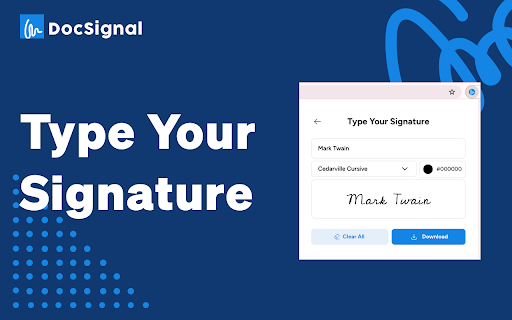
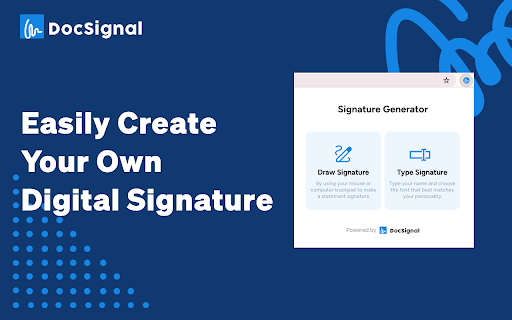
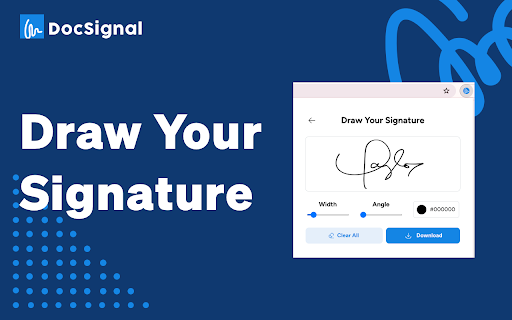
Generate signatures by drawing or simply typing
Generate Authentic Digital Signatures Easily
Signature Generator is a powerful Chrome extension that allows you to quickly create professional-looking digital signatures for signing documents electronically. Whether you prefer drawing with your mouse or typing, this extension provides a seamless way to capture your unique signature.
Key Features:
- Draw Your Signature: Use your mouse or touchscreen to draw your signature in a natural and intuitive manner, mimicking the experience of signing on paper.
- Type Your Signature: If you prefer a typed approach, simply enter your name, and the extension will convert it into an elegant digital signature.
- Preview and Customize: Before finalizing your signature, preview it and make adjustments to factors like size, color, and opacity to ensure it meets your preferences.
- Download and Use: Once you're satisfied with your digital signature, download it as an image file (PNG or JPG) and use it to sign documents, contracts, forms, and more with a single click.
- Secure and Legally Binding: Digital signatures generated by this extension are legally binding and accepted by most institutions, eliminating the need for printing, scanning, and faxing.
Streamline your document workflow and embrace the convenience of electronic signatures with Signature Generator. Say goodbye to the hassle of printing and scanning, and sign your important documents effortlessly from any device with this user-friendly Chrome extension.
| 分类 | 🛠️工具 |
| 插件标识 | hfbinmilecmpnciahlgbkfgcpcofffll |
| 平台 | Chrome |
| 评分 |
☆☆☆☆☆
0
|
| 评分人数 | 9 |
| 插件主页 | https://chromewebstore.google.com/detail/signature-generator/hfbinmilecmpnciahlgbkfgcpcofffll |
| 版本号 | 1.0.0 |
| 大小 | 545KiB |
| 官网下载次数 | 480 |
| 下载地址 | |
| 更新时间 | 2024-04-11 00:00:00 |
CRX扩展文件安装方法
第1步: 打开Chrome浏览器的扩展程序
第2步:
在地址栏输入: chrome://extensions/
第3步: 开启右上角的【开发者模式】
第4步: 重启Chrome浏览器 (重要操作)
第5步: 重新打开扩展程序管理界面
第6步: 将下载的crx文件直接拖入页面完成安装
注意:请确保使用最新版本的Chrome浏览器
同类插件推荐

SignSecure : PDF Digital Signature Signing
The extension for signing PDF files with usb eToke

Online Signature
The Online Signature Chrome Extension is a secure

AI Signature Generator - SignMaker
Free ai signature generator. Make a personalized s

Digital signature on website - VN Customs
An application to perform digital signature on the
Signature Generator
Generate signatures by drawing or simply typingGen

email signature generator - signmaker.io
Helps you quickly create a personalized, professio

Online Signature Generator for Email & PDF
The easiest way to add e-signatures to your emails
PDF Signature Pad
Create beautiful signature with ease and optionall

Signer.Digital Digital Signature, PKI
Digital Signature of eReturns, PDF & Web User

PDF 签名
快速签署PDF文档。在文档上自定义并将您的PDF签名数字化放置。PDF 签名 是一款强大的 Chro

Email Tracker
Free Email Tracker for GmailEmail Tracker is your

电子邮件签名生成器
使用我们的电子邮件签名生成器创建专业的电子邮件签名,这是制作用于 Gmail、Outlook 等的页

Email Signature Generator by cloudHQ
cloudHQ 提供的免费电子邮件签名生成器和签名模板Are you looking for an