
Comic Text Chrome 插件, crx 扩展下载
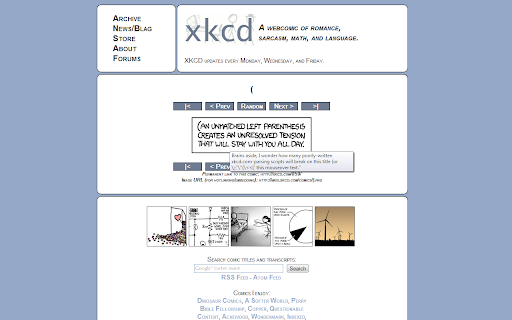
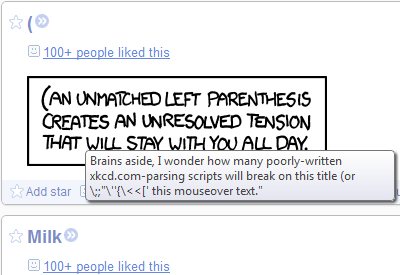
Replaces the built-in Chrome tooltip to enable easier reading of the mouseover title-text for popular webcomics, such as xkcd.
The source code for this extension is available on Github.
https://github.com/dmillz/Comic-Text
NOTE: There is no way for me to respond to questions posted in the comments here in the Chrome Web Store. If you have a question, please contact me on Github instead:
https://github.com/dmillz/Comic-Text/issues
What is Comic Text?
------------------------------
Comic Text is a Chrome extension that seamlessly replaces the built-in Chrome tooltip to enable easier reading of the mouseover title-text for popular web comics, such as xkcd.
New! Comic Text is now capable of scanning the entire page and replacing tooltips for *any* page element, not just images. Turn on the option by accessing the Comic Text extension options ([Puzzle Piece Icon] > Comic Text [3-dot menu] > Options)
What's wrong with Chrome's mouseover text tooltips?
-----------------------------------------------------------------------------
In years past, Chrome's title text tooltips didn't last long enough to read the entirety of the mouseover title text on many popular web comics, such as [xkcd](xkcd.com). By default, Chrome's tooltips disappeared after about 5 seconds; but with Comic Text installed, they will last as long as your mouse remains over the image.
Chrome's default tooltip behavior was fixed in 2014 (https://issues.chromium.org/issues/40266368), but this extension still improves tooltip behavior and enables customization of the appearance of the tooltip text for improved accessibility.
Does this extension work on websites other than xckd.com?
---------------------------------------------------------------------------------------
Yes! By default, the Comic Text will "just work" when browsing xkcd.com, and you may use the extension options to customize the styling of the popup, or to enable Comic Text on your other favorite sites. (Access the extension options by clicking [Wrench Icon] > Tools > Extensions, and then find the "Options" link under the Comic Text extension.)
Why does the extension require permission to access "Your data on all websites"?
------------------------------------------------------------------------------------------------------------------------
The extension works by modifying the HTML/CSS of any pages that are on the whitelist. On image mouseover, the script removes any existing title text of the image in order to suppress the built-in tooltips, and then pops-up a new DOM element, cleverly styled to mimic the default Chrome tooltip.
The extension requires the "Your data on all websites" permission so that it can modify the page you're browsing in this manner, but that's the only thing it does. It does not save any information (besides it's own options), nor does it communicate with the outside world. Everyone is welcome to examine (and reuse, remix, & share) the source code:
https://github.com/dmillz/Comic-Text
Comic Text doesn't seem to work on <my favorite site>.
--------------------------------------------------------------------------------
If you find a bug, or just have any other question, please submit it as an issue on Github:
https://github.com/dmillz/Comic-Text/issues
Thanks!
The Comic Text popup sometimes gets in my way.
-------------------------------------------------------------------------
You may dismiss the Comic Text tooltip by right-clicking on it.
# Thank you, Randall Munroe
Thank you, Randall Munroe, for the hilarious web comic, and also for releasing your work under the Creative Commons Attribution-NonCommercial 2.5 License (http://creativecommons.org/licenses/by-nc/2.5/). All of Comic Text's icons, images, screenshots, and inspiration have been derived from xkcd (http://xkcd.com).
# Changelog
## [3.0.0] - 2024-02-20
### Changed
- Updated to support "manifest v3" extension requirements.
- No more jQuery, just browser native APIs.
### Added
- Experimental support for dark mode. This will only take effect for users who have dark mode enabled, but have not customized their CSS.
## [2.0.0] - 2018-08-31
### Changed
- Updated to support v2 Chrome extension requirements.
## [1.2.4] - 2011-09-02
### Added
- The Comic Text tooltip may now be dimissed by right clicking on it.
## [1.2.1] - 2011-08-07
### Added
- Optionally replace tooltips for *ALL* HTML elements, not just images.
- Shiny new options page.
### Changed
- Rewritten tooltip engine for superior performance.
## [1.1.2] - 2011-02-24
### Fixed
- Fixed bug in the way the popup was being positioned
- Extension should now load slightly faster
## [1.1.1] - 2011-02-18
### Fixed
- Fixed loading of default whitelist.
## [1.1.0] - 2011-02-12
### Changed
- Some "under the hood" changes.
## [1.0.5] - 2011-01-31
### Changed
- Popup is now positioned offset below the mouse cursor.
- Another minor CSS tweak.
### Fixed
- Fix for issue where popups would get "stuck" when quickly mousing between multiple titled images.
## [1.0.4] - 2011-01-30
### Changed
- CSS updated to more closely mimic Chrome.
## [1.0.2] - 2011-01-29
### Changed
- CSS updated to more closely mimic Chrome.
## [1.0.1] - 2011-01-27
### Changed
- Fix to support Google Reader
## [1.0.0] - 2011-01-27
### Changed
- Initial Release
| 分类 | ♿无障碍访问 |
| 插件标识 | hfpglafkfedcnnojpioconphfcelcljj |
| 平台 | Chrome |
| 评分 |
★★★★☆
4.1
|
| 评分人数 | 10 |
| 插件主页 | https://chromewebstore.google.com/detail/comic-text/hfpglafkfedcnnojpioconphfcelcljj |
| 版本号 | 3.0.0 |
| 大小 | 30.07KiB |
| 官网下载次数 | 687 |
| 下载地址 | |
| 更新时间 | 2024-02-21 00:00:00 |
CRX扩展文件安装方法
第1步: 打开Chrome浏览器的扩展程序
第2步:
在地址栏输入: chrome://extensions/
第3步: 开启右上角的【开发者模式】
第4步: 重启Chrome浏览器 (重要操作)
第5步: 重新打开扩展程序管理界面
第6步: 将下载的crx文件直接拖入页面完成安装
注意:请确保使用最新版本的Chrome浏览器
同类插件推荐

Comics
Collection of comics from gocomics.comExtended ver

XKCD Hovertext
This extension replaces native browser title text

XKCD Alt Text
The XKCD Alt Text extension makes it slightly easi
Comic Text
Replaces the built-in Chrome tooltip to enable eas
xkcd - Comics Viewer
View xkcd comics from any page.Read your favourite

Google Chrome™漫画阅读器
从Google云端硬盘或本地计算机上快速阅读漫画书。想今天在线阅读漫画吗?只需今天就安装适用于Goo

grokfaster
speed read the internet, grok what you need to, fa

Text Toolkit : (AIO Text Tools)
All-In-One free and useful text tools collection.T

calc-extension
Calculate values of mathematical expressions# calc

LinkTips
Show URLs in all link title tooltips and allow cus

ScanLingua
Scan, recognize and translate parts of your screen

Frame OCR
Chrome Extension for Frame OCRThis is a basic capt

3read
3read allows you to read selected text in 3 dimens