
WA Contact Exporter - Download Group or Label Contact Chrome 插件, crx 扩展下载
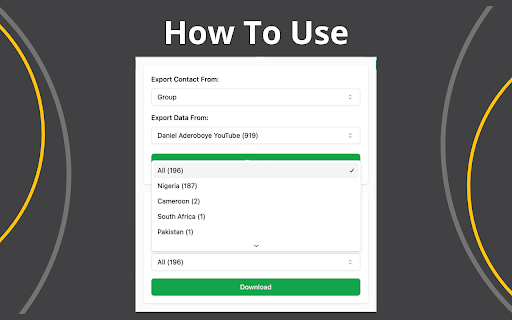
Export WhatsApp contacts to Excel.
Easy download the WhatsApp Contact
Easy Export the WhatsApp Contact
Key Features
✓ Good-looking UI
✓ 100% Free
✓ All the features are free
✓ Export the WhatsApp contact from Your Chat list
✓ Export the WhatsApp contact from Group
✓ Export the WhatsApp contact from Label
How to get started?
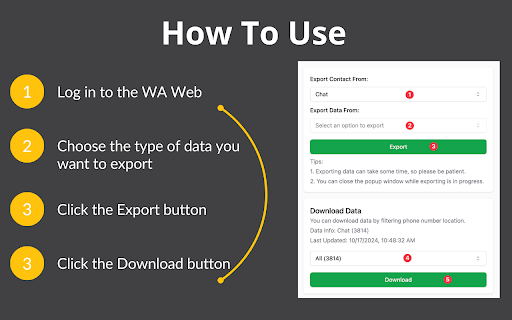
1. Open web.whatsapp.com and log in by scanning the QR code
2. Open the "WA Contact Exporter" extension
3. Choose the type of data you want to export
4. Click the "Export" Button
5. Click the "Download" Button
Is it free?
Yes, WA Contact Exporter is free to use.
All the features are free.
Need more features?
Contact me via email and let me know your ideas.
FAQ
If it's not working, try disabling other WhatsApp extensions and retry.
For assistance, contact us for email.
Data Privacy
All data remains on your local device and never passes through our servers.
| 分类 | 🛠️工具 |
| 插件标识 | hhdbnegknceogocfmlpadmigjcndkodm |
| 平台 | Chrome |
| 评分 |
★★★★★
5
|
| 评分人数 | 993 |
| 插件主页 | https://chromewebstore.google.com/detail/wa-contact-exporter-downl/hhdbnegknceogocfmlpadmigjcndkodm |
| 版本号 | 0.1.8 |
| 大小 | 328KiB |
| 官网下载次数 | 294 |
| 下载地址 | |
| 更新时间 | 2025-01-18 00:00:00 |
CRX扩展文件安装方法
第1步: 打开Chrome浏览器的扩展程序
第2步:
在地址栏输入: chrome://extensions/
第3步: 开启右上角的【开发者模式】
第4步: 重启Chrome浏览器 (重要操作)
第5步: 重新打开扩展程序管理界面
第6步: 将下载的crx文件直接拖入页面完成安装
注意:请确保使用最新版本的Chrome浏览器
同类插件推荐
WA Contact Exporter - Download Group or Label Contact
Export WhatsApp contacts to Excel.Easy download th

WhatsApp群组联系人导出器和备份工具 - wabulk.net
快速导出、提取和备份您的WhatsApp联系人,支持按联系人、聊天、群组和国家/地区等维度筛选。Th

Wasup - WhatsApp群组号码导出工具
轻松将WhatsApp群组联系人和聊天联系人导出为CSV、Excel文件。? Wasup - Wh

WA Contacts Extractor
Extract and export all WhatsApp contacts from grou