
Web Cleaner - Hide & Block Elements Chrome 插件, crx 扩展下载
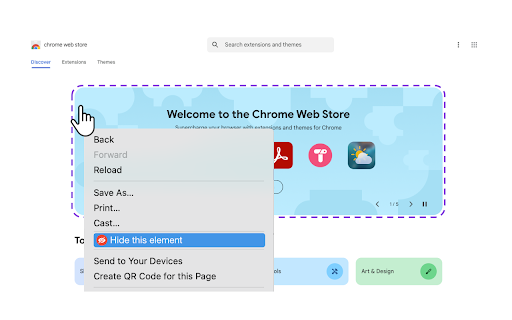
Right-click to hide any unwanted website element. Remove ads, popups, and clutter for distraction-free browsing.
Easily remove, hide, or block unwanted content on any webpage with a simple right-click. This powerful webpage customization tool helps you clean up cluttered websites and remove distracting elements. Perfect for creating a cleaner, more focused browsing experience!
✨ Perfect for:
- Creating distraction-free reading environments
- Removing annoying popups, ads, and banners
- Customizing news sites and social media feeds
- Taking clean screenshots
- Blocking unwanted website sections
- Making websites more focused and readable
? Key Features:
- One-click element removal
- Smart visual highlighting before blocking
- Site-specific memory (settings persist per website)
- Easy restore option
- Works on all websites
- No coding required
? Popular Uses:
- Remove social media distractions
- Block promotional popups
- Clean up news websites
- Customize web applications
- Create focused work environments
Take control of how you browse the web - customize any website with just a right-click.
| 分类 | 🛠️工具 |
| 插件标识 | hjbecmgoamolhfpjckphlekjdnkdpbfi |
| 平台 | Chrome |
| 评分 |
★★★★☆
4.5
|
| 评分人数 | 46 |
| 插件主页 | https://chromewebstore.google.com/detail/web-cleaner-hide-block-el/hjbecmgoamolhfpjckphlekjdnkdpbfi |
| 版本号 | 1.3 |
| 大小 | 231KiB |
| 官网下载次数 | 109 |
| 下载地址 | |
| 更新时间 | 2025-02-02 00:00:00 |
CRX扩展文件安装方法
第1步: 打开Chrome浏览器的扩展程序
第2步:
在地址栏输入: chrome://extensions/
第3步: 开启右上角的【开发者模式】
第4步: 重启Chrome浏览器 (重要操作)
第5步: 重新打开扩展程序管理界面
第6步: 将下载的crx文件直接拖入页面完成安装
注意:请确保使用最新版本的Chrome浏览器
同类插件推荐
Web Cleaner - Hide & Block Elements
Right-click to hide any unwanted website element.

Hide That!
This extension can hide or remove selected element

Ghostery 跟踪器和广告拦截器 - 隐私广告拦截器
功能强大且易于使用的隐私扩展。阻止广告、跟踪器并加速您的网络。.Ghostery是一个免费的浏览器扩

Ads Blocker
Ads Blocker - blocks all annoying ads, malware and