
Quick Duplicate Bookmarks Finder Chrome 插件, crx 扩展下载
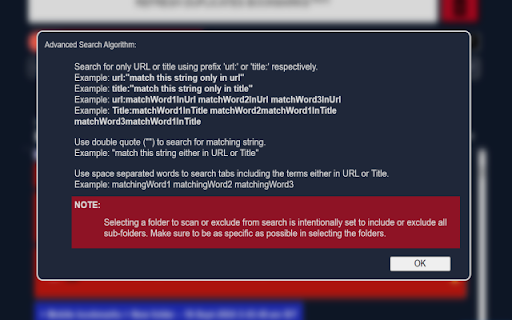
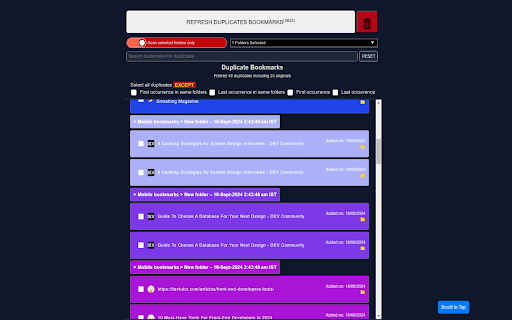
Quick Duplicate Bookmarks Finder is a browser extension designed to help you efficiently search and eliminate duplicate bookmarks
Quick Duplicate Bookmarks Finder is a browser extension designed to help you efficiently search and eliminate duplicate bookmarks.
Overview:
Quick Duplicate Bookmarks Finder is an essential browser extension that is designed to help you efficiently eliminate duplicate bookmarks. It offers powerful tools to search, and eliminate duplicate bookmarks, ensuring your bookmark library remains clutter-free and easy to navigate.
Features:
Duplicate Bookmark Detection: Automatically scan your bookmarks to find and list the duplicates bookmarks. It allows to select duplicate bookmarks and remove to keep bookmarks library clean and organized.
Comprehensive Search Functionality: Quickly find specific bookmarks using a powerful search tool that scans through your duplicate bookmark collection and allows to edit them.
Easy To Search Interface: User-friendly interface to easily search through the duplicate bookmarks.
Select Folders: Now you can select folders to either exclude bookmarks from that folder from counting as duplicate or you can select folders to search for duplicate inside those folders only.
How to Use:
Install the Extension: Click on "Add to Browser" to install the Bookmark Finder and Duplicate Manager.
Open the Extension: Click on the extension icon in your browser toolbar to open the bookmark finder interface.
Scan for Duplicates: Use the duplicate finder tool to scan your bookmarks and remove any duplicates.
Search Bookmarks: Use the search bar to quickly find out if any specific link is a duplicate bookmark or not.
Permissions:
This extension requires access to your bookmarks to provide its features. We prioritize your privacy and do not collect or share any personal data.
Update v2.6.0
- Improved text color for readability.
- Added search folders feature in dropdown.
Update v2.7.0
- Fixed unnecessary refresh on bookmark detail changes.
Note: With this update, after making changes to the URL, you'll need to manually refresh bookmarks to update the latest duplicate bookmarks.
Found Bugs? Report it here!
| https://report-bugs.vercel.app
| 分类 | 🛠️工具 |
| 插件标识 | hjiaieibgociindhongdoeokppalmabk |
| 平台 | Chrome |
| 评分 |
★★★★☆
4.6
|
| 评分人数 | 246 |
| 插件主页 | https://chromewebstore.google.com/detail/quick-duplicate-bookmarks/hjiaieibgociindhongdoeokppalmabk |
| 版本号 | 2.7.0 |
| 大小 | 42.59KiB |
| 官网下载次数 | 74 |
| 下载地址 | |
| 更新时间 | 2025-01-31 00:00:00 |
CRX扩展文件安装方法
第1步: 打开Chrome浏览器的扩展程序
第2步:
在地址栏输入: chrome://extensions/
第3步: 开启右上角的【开发者模式】
第4步: 重启Chrome浏览器 (重要操作)
第5步: 重新打开扩展程序管理界面
第6步: 将下载的crx文件直接拖入页面完成安装
注意:请确保使用最新版本的Chrome浏览器
同类插件推荐
Quick Duplicate Bookmarks Finder
Quick Duplicate Bookmarks Finder is a browser exte

书签 & 历史记录 管理器
开源的小插件。 可以快速搜索书签、历史记录。开源的小插件,源码: https://github.co

Tag Explorer
Tag Explorer is a powerful extension designed to s

Visual bookmarks
Simple speed dial bookmarks page, including search