
Jira Board Backlog Status Enhancer Chrome 插件, crx 扩展下载
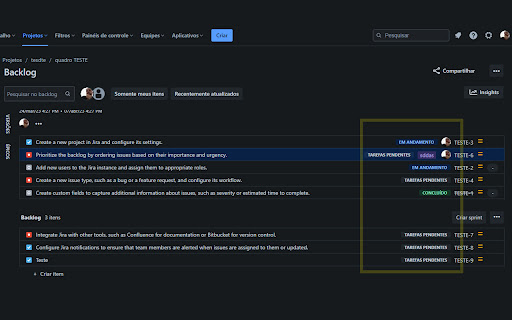
Adds color-coded status labels to issues on the Jira Board backlog page, improving workflow visualization for users.
This is a browser extension that adds missing issue status information to the backlog page of Jira. It is available for download on the Chrome Store.
The extension was motivated by the issue of missing issue status information on the backlog page of Jira projects managed by companies. This made it difficult to view the status of each issue on the task board, resulting in an unorganized display of information. With this extension, the status of each issue is now displayed on the task board, resulting in a more organized and easily readable display of information.
PRIVACY
No tracking, no advertising, and nothing else nefarious.
SOURCE CODE
github.com/medeirosinacio/jira-backlog-issue-status-extension
ISSUES
github.com/medeirosinacio/jira-backlog-issue-status-extension/issues
| 分类 | 📝工作流程与规划 |
| 插件标识 | hmhebmpaadglhidmcjlnanfkeklombkk |
| 平台 | Chrome |
| 评分 |
☆☆☆☆☆
0
|
| 评分人数 | 2 |
| 插件主页 | https://chromewebstore.google.com/detail/jira-board-backlog-status/hmhebmpaadglhidmcjlnanfkeklombkk |
| 版本号 | 0.3.2 |
| 大小 | 461KiB |
| 官网下载次数 | 80 |
| 下载地址 | |
| 更新时间 | 2023-05-10 00:00:00 |
CRX扩展文件安装方法
第1步: 打开Chrome浏览器的扩展程序
第2步:
在地址栏输入: chrome://extensions/
第3步: 开启右上角的【开发者模式】
第4步: 重启Chrome浏览器 (重要操作)
第5步: 重新打开扩展程序管理界面
第6步: 将下载的crx文件直接拖入页面完成安装
注意:请确保使用最新版本的Chrome浏览器
同类插件推荐

Jira Sticky Header
Fixes small but annoying problem in Jira: non-stic

Jira Ticket Rank
The extension simply displays rank for each Jira t

Jira Backlog Status
This extension displays Jira Ticket Statuses in th

Jira Status Colours
Customize the colours of your Jira statuses.Do you

Transform 3D page
Transform page into 3DThis app will turn your page

Jira On Fire by Kolossi
For cloud-hosted jira (https://*.atlassian.net) th

Jira - Estimations sum for columns in boards
This extension sums up the estimates for each colu

Jira Color Component
This extensions change color for Jira componentThi
Jira Board Backlog Status Enhancer
Adds color-coded status labels to issues on the Ji

Jira Issue Opener
Opens Jira linksOpen Jira issues quickly by select

GitLab CI Lint - UI Enhancer
GitLab CI Lint - UI Enhancer, enhances your CI Lin

Jira Ticket Link Generator - Cloud Edition
Generates a nice looking link for Jira tickets con