
JIRA Template Injector Chrome 插件, crx 扩展下载
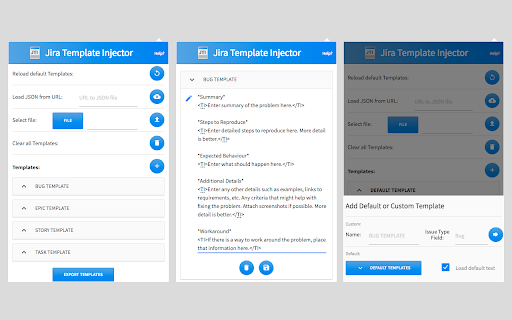
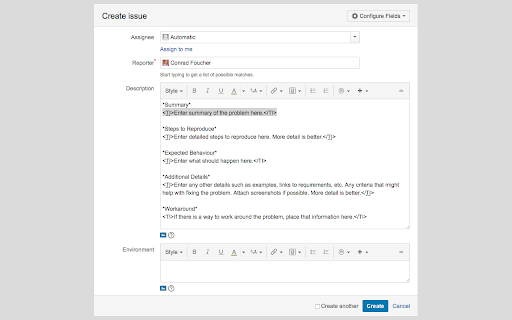
The description field of new JIRA issues will automatically be populated with a template relevant to the issue type
This extension automatically inserts a template of your choosing into the JIRA Create Issue Description field. The template injected is relative to the selected "Project" and “Issue Type” within the Create Issue modal on JIRA.
On initial install a default list of templates are pre populated for you. These can easily be removed/restored at any time.
By default the extension works for cloud hosted JIRA instances (*.atlassian.net domains). If you are using a self hosted JIRA instance or a custom domain, you may add your own custom domains for the extension to check against. You may also add any custom input IDs for which you would like your templates to be injected into.
You can add templates individually, or bulk add them through a local or remote json file. See Support & FAQ for an example JSON file.
Features:
* Automatically select text between
<TI> and </TI> tags for quick template
completion.
* Quickly jump to the next set of <TI>
elements using the 'Control + back-tick'
key combo.
* Template Priorities.
* The default template (no Issue Type and
no Projects specified) will be used for all
Issue Types and Projects.
* Templates with Projects and no
Issue Type will override the default template.
* Templates with Issue Type and no Projects
will override templates with Projects and
no Issue Type.
* Templates with Issue Type and Projects
will override all other templates.
* Templates are synced across devices.
* Configure once, use on all chrome
devices that support extensions!
* Reload default templates with one click.
* Load templates from url (json file).
* Host a single json file and have everyone
use the same templates.
* Load templates from local file (json).
Easily share templates with other users.
* Add/Remove/Edit individual templates.
* Add/Remove custom domains.
* Domains (including subdomains) the extension
should run on to inject the templates.
* Limit interface options
(To keep templates consistent across users)
* Current limit options are:
* "all" -> disable all interface actions
except reload default
* "url" -> disable loading of json
from url
* "file" -> disable loading of json
from local file
* "clear" -> disable clearing of
all templates
* "delete" -> disable deleting
single template
* "save" -> disable saving/updating
single template
* "add" -> disable add new template
menu
* "add-custom" -> disable adding
custom template
* "add-default" -> disable adding
default template
* "add-domain" -> disable adding
additional domains
* Export Templates to JSON file. Easily share
template JSON file.
| 分类 | 📝工作流程与规划 |
| 插件标识 | hmhpegjieopgbdmpocdmfkafjgcdmhha |
| 平台 | Chrome |
| 评分 |
☆☆☆☆☆
|
| 评分人数 | |
| 插件主页 | https://chromewebstore.google.com/detail/jira-template-injector/hmhpegjieopgbdmpocdmfkafjgcdmhha |
| 版本号 | 1.2.5 |
| 大小 | 510KiB |
| 官网下载次数 | 3000 |
| 下载地址 | |
| 更新时间 | 2021-05-16 00:00:00 |
CRX扩展文件安装方法
第1步: 打开Chrome浏览器的扩展程序
第2步:
在地址栏输入: chrome://extensions/
第3步: 开启右上角的【开发者模式】
第4步: 重启Chrome浏览器 (重要操作)
第5步: 重新打开扩展程序管理界面
第6步: 将下载的crx文件直接拖入页面完成安装
注意:请确保使用最新版本的Chrome浏览器