
Milestone Schema Editor Chrome 插件, crx 扩展下载
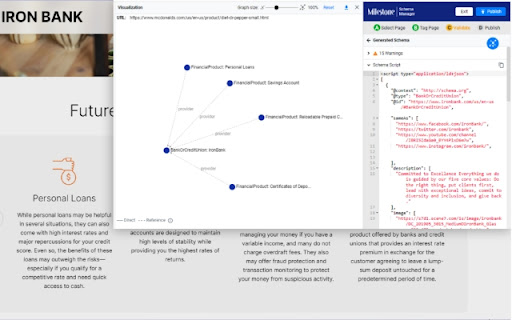



Create and deploy JSON-LD structured data or schema on your web pages effortlessly using Milestone Schema Editor.
Milestone Schema Editor makes the entire journey of schema implementation on your web pages easy. From schema generation, validation, and publishing, carry out the whole process in a much more simplified manner. Follows Schema.org’s vocabulary and guidelines layered with Google’s Rich Result’s validation.
Enable the plugin and get going. Based on your industry and web page content, you’ll have suggested schema displayed for you to choose from. To ensure you’re capturing all the entities on your page, choose the schema type and simply point and click to populate your schema fields.
Milestone Schema Editor takes it a step ahead with notifications for both content obsolete schema as well as deprecated schema, and comes with time-saving features such as auto-tagging and clone schema. Build trust with the search engine and even integrate your pages with Wikipedia.
The built-in validator will ensure that you’re addressing any schema errors and warnings (your content opportunities) prior to publishing them. What’s better? You’ll even have a visualizer to know how you’re mapping your entities, offering you cues to entity optimization to build a perfect nested schema architecture.
Key Features:
‾‾‾‾‾‾‾‾‾‾‾‾‾‾‾‾‾‾‾
- Supports 750+ schema types
- Suggests schema based on your industry and website content
- Auto-detection of schema
- Point and click population of schema fields
- Bulk publish schema
- Advanced configurations: Global Schema, Wikipedia Integrations, X-Path, Custom Rules, Advanced Filter, etc.
- In-built validation for errors and warnings callout prior to publish
- Visualizer that displays entity mapping
Available for all existing Milestone Schema Customers.
| 分类 | 💻开发者工具 |
| 插件标识 | hocfihmnjcjabmegbmmblhhlcaikjopi |
| 平台 | Chrome |
| 评分 |
★★★★★
5
|
| 评分人数 | 3 |
| 插件主页 | https://chromewebstore.google.com/detail/milestone-schema-editor/hocfihmnjcjabmegbmmblhhlcaikjopi |
| 版本号 | 0.2.20 |
| 大小 | 38.61KiB |
| 官网下载次数 | 97 |
| 下载地址 | |
| 更新时间 | 2025-02-10 00:00:00 |
CRX扩展文件安装方法
第1步: 打开Chrome浏览器的扩展程序
第2步:
在地址栏输入: chrome://extensions/
第3步: 开启右上角的【开发者模式】
第4步: 重启Chrome浏览器 (重要操作)
第5步: 重新打开扩展程序管理界面
第6步: 将下载的crx文件直接拖入页面完成安装
注意:请确保使用最新版本的Chrome浏览器
同类插件推荐

Conductor for Chrome - SEO Extension
Experience faster, better, smarter SEO insights in
SEO Extractor
Tools to extract and analyze SEO dataUpdate: This

Rich Results - Structured Data Test Plugin
Extension checks the current URL in browser with G

Milestone Schema Editor
Create and deploy JSON-LD structured data or schem

SEOMarkup Structured Data Schema Inspector
Inspect Structured Schema Markups with SEOMarkup.s

OpenLink Structured Data Sniffer
Reveals structured metadata (Microdata, RDFa, JSON

Sprout SEO Extension ?
Speed up your daily SEO routine, get one-click ins

SEO Schema Visualizer
Visualize JSON-LD schema markup at the click of a

GMBspy
Allows viewing of Google Business Profile, Google

Schema Builder for Structured Data
Easily build validated json-ld structured data mar

Ryte structured data helper
The Ryte Structured Data Helper is a handy overvie

Core SERP Vitals
Show the Core Web Vitals data from the Chrome User

Google Search Console Enhanced Analytics
Google Search Console Enhanced Analytics is a simp