
WebGPU Inspector Chrome 插件, crx 扩展下载
WebGPU Inspector Debugging Tools
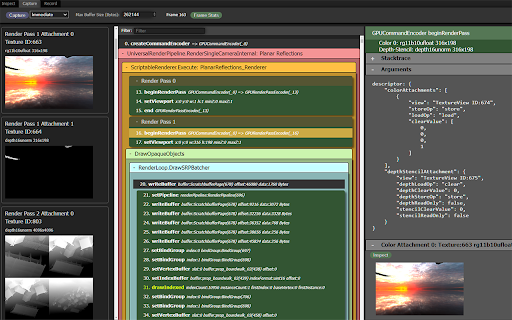
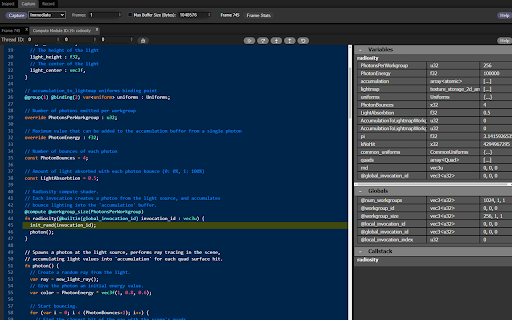
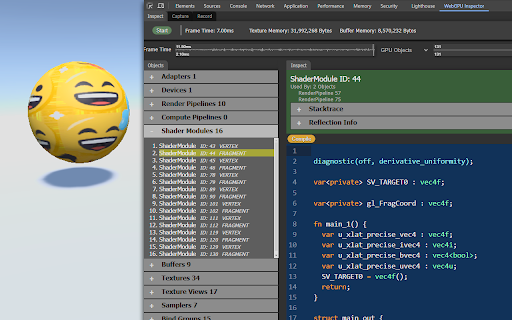
WebGPU Inspector is a Chrome Developer Tools extension for debugging WebGPU content. It intercepts all WebGPU objects and commands, allowing you to inspect information about any GPU object.
* Inspect any WebGPU object, with a stacktrace for where it was created.
* Capture frames, including all commands, buffers, textures, and render pass results.
* Catch errors compiling shader modules and pipelines.
* Display textures, at any mip level.
* Edit shaders live on the page to debug and test shader changes.
* Debug shaders (highly experimental, work in progress, limited to compute shaders).
* Plot frame times and GPU object counts over time for profiling information.
* View uniform and storage buffer content used for draw and dispatch calls.
* Record all commands and data used to render a set of frames, generating a standalone HTML file that can recreate the render.
| 分类 | 💻开发者工具 |
| 插件标识 | holcbbnljhkpkjkhgkagjkhhpeochfal |
| 平台 | Chrome |
| 评分 |
★★★☆☆
3.7
|
| 评分人数 | 3 |
| 插件主页 | https://chromewebstore.google.com/detail/webgpu-inspector/holcbbnljhkpkjkhgkagjkhhpeochfal |
| 版本号 | 0.11.0 |
| 大小 | 283KiB |
| 官网下载次数 | 1000 |
| 下载地址 | |
| 更新时间 | 2025-02-23 00:00:00 |
CRX扩展文件安装方法
第1步: 打开Chrome浏览器的扩展程序
第2步:
在地址栏输入: chrome://extensions/
第3步: 开启右上角的【开发者模式】
第4步: 重启Chrome浏览器 (重要操作)
第5步: 重新打开扩展程序管理界面
第6步: 将下载的crx文件直接拖入页面完成安装
注意:请确保使用最新版本的Chrome浏览器
同类插件推荐

CanvaSpy
Web Graphics DebuggerRecords trace files for debug
WebGPU Inspector
WebGPU Inspector Debugging ToolsWebGPU Inspector i

webgpu-devtools
WebGPU devtools for debugging WebGPU applicationsW

Shader Editor
Live editing shaders in the browser.A Chrome DevTo

PixiJS DevTools
DevTools for PixiJSThe official Chrome devtools ex

Spector.js
Explore and Troubleshoot your WebGL scenes easily.

Heystak
Save Facebook and TikTok ads.Heystak.co - Your Ul

TIO Syntax Highlighter
Syntax highlighter for Try It Online (https://tio.

AuthentiSci
Allows scoring of media articles by the research c

GL Git Clone
Adds 'git clone' to the ssh/https clone ur

LeadhuntAI - Chrome Extension
This extension will allow you to easily retrieve s

ChatGPT Recall Prompts
I recall ChatGPT prompts. That's it!"Chat

Clear Portal Cache
Clearing the cache with a single click!Easily clea