
USC Easy Scheduler Chrome 插件, crx 扩展下载
Create your ideal class schedule conveniently
Helps you create your ideal class schedule without having to deal with clunky webreg.
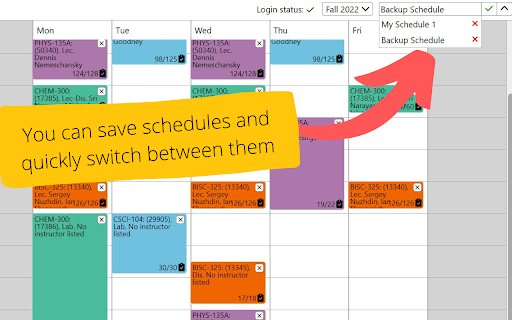
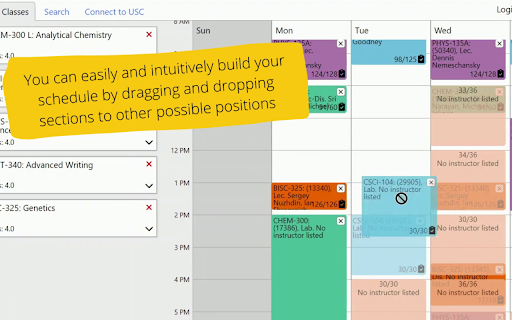
Easily build and modify your schedule through a clean interface. You can drag and drop course sections on the calendar to schedule with ease, and save multiple schedules that you can quickly switch between. Your schedule from this extension can be sent to webreg with one click under the "Connect to USC" tab.
Calendar icon by Freepik - https://www.flaticon.com/free-icon/calendar_591607.
| 分类 | 📝工作流程与规划 |
| 插件标识 | iadkfckdkenffbeonehcgingjpdnhbgm |
| 平台 | Chrome |
| 评分 |
★★★★★
5
|
| 评分人数 | 3 |
| 插件主页 | https://chromewebstore.google.com/detail/usc-easy-scheduler/iadkfckdkenffbeonehcgingjpdnhbgm |
| 版本号 | 1.0 |
| 大小 | 3.75MiB |
| 官网下载次数 | 37 |
| 下载地址 | |
| 更新时间 | 2022-08-29 00:00:00 |
CRX扩展文件安装方法
第1步: 打开Chrome浏览器的扩展程序
第2步:
在地址栏输入: chrome://extensions/
第3步: 开启右上角的【开发者模式】
第4步: 重启Chrome浏览器 (重要操作)
第5步: 重新打开扩展程序管理界面
第6步: 将下载的crx文件直接拖入页面完成安装
注意:请确保使用最新版本的Chrome浏览器
同类插件推荐
USC Easy Scheduler
Create your ideal class schedule convenientlyHelps

USC Schedule Helper
A tool to help you find classes at USCThis extensi

Okta Profile reorder
Set Index for order of attributesOkta Profile Edit

Password Converter
Convert your EASY password into DIFFICULT password

Twitter Following as default
Sets your default Twitter frontpage to Following i

Google Shade
Highlight google ads so they stand out from real c

EstateGPT Chatbot
Your AI-powered Real Estate Investment ExpertDisco

EnkinGT Tracker
Track your productivity quickly and in real time w

HN Notifier - Hacker News Reply Notifications
Notifies you via in-app bell and email when you ge

TLDR.AI
Say goodbye to information overloadIntroducing TLD

SpellTable Total Turn Timer
Adds a timer to each player that keeps track of th

SHR
Capture SHRThis browser extension can capture root
Easy Night Shift
Adjust screen brightness to a protective color fro