
Scribe-a-saurus - Speech-To-Text Dictation Chrome 插件, crx 扩展下载

Transcribe your speech to text instantly. Speak, and see your words on screen with one click.
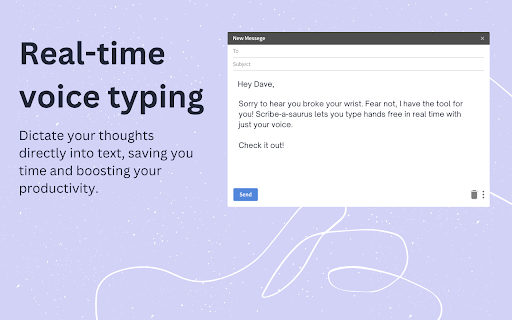
Scribe-a-saurus is a speech-to-text tool that lets you dictate your thoughts directly into text, saving you time and boosting your productivity.
Whether you're writing emails in Gmail or Outlook, chatting with ChatGPT, or jotting down quick notes, Scribe-a-saurus ensures that your words are captured accurately and seamlessly.
Sit back and focus on communicating your thoughts, not on typing.
Ideal for anyone who finds typing tedious or challenging.
KEY FEATURES
? Free to use
? Transcribes in real-time (<300ms latency)
? Private & secure - we never store your transcripts
? Works in any website that has a textbox (e.g Gmail, Outlook, ChatGPT...)
? Inserts transcription directly into the active textbox (no copy & pasting)
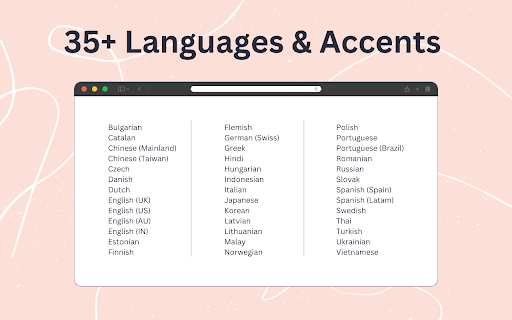
? Support for 35+ languages (including Mandarin, Spanish, French, Russian...)
? Support for accents (e.g Latin American vs Spain)
UPCOMING FEATURES
- Shortcut voice commands
SUPPORT
We are just starting out after seeing how useful it was in our own lives.
We would love to hear your feedback! Email us at [email protected]
| 分类 | ♿无障碍访问 |
| 插件标识 | iaihnaebfnekbaigahlcpdinadenmijl |
| 平台 | Chrome |
| 评分 |
★★★★☆
4.2
|
| 评分人数 | 3249 |
| 插件主页 | https://chromewebstore.google.com/detail/scribe-a-saurus-speech-to/iaihnaebfnekbaigahlcpdinadenmijl |
| 版本号 | 1.10 |
| 大小 | 1.02MiB |
| 官网下载次数 | 309 |
| 下载地址 | |
| 更新时间 | 2024-10-25 00:00:00 |
CRX扩展文件安装方法
第1步: 打开Chrome浏览器的扩展程序
第2步:
在地址栏输入: chrome://extensions/
第3步: 开启右上角的【开发者模式】
第4步: 重启Chrome浏览器 (重要操作)
第5步: 重新打开扩展程序管理界面
第6步: 将下载的crx文件直接拖入页面完成安装
注意:请确保使用最新版本的Chrome浏览器
同类插件推荐

Popup Dict (Dictionary.com/Youglish/Cambridge Dict)
Look up words instantly while you browse. Highligh

Scribe-a-saurus - Speech-To-Text Dictation
Transcribe your speech to text instantly. Speak, a

Image Translator
Translate image text instantly with Image Translat

ReadText (Text to Speech Reader)
Single-click text-to-speech magic directly in your