
Blixem | ChatGPT conversational sidebar Chrome 插件, crx 扩展下载


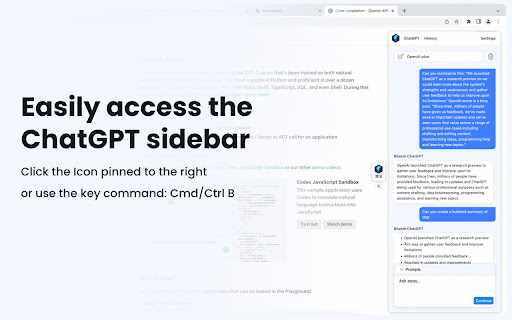
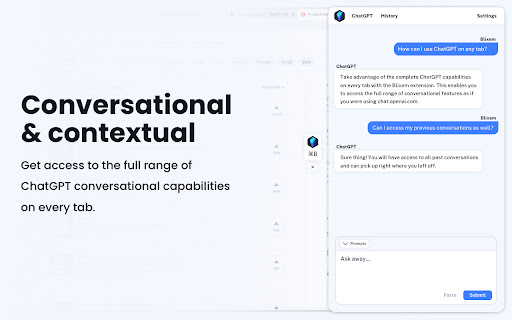

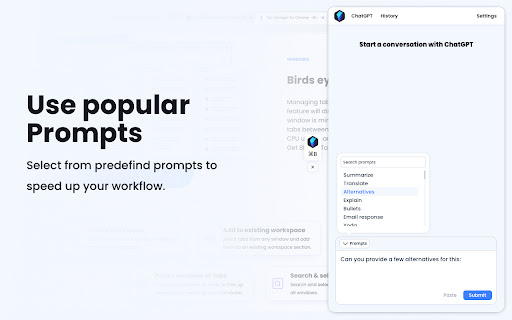
Access full ChatGPT features on every website with Blixem, including the ability to continue conversations across tabs.
Blixem provides access to ChatGPT's full range of conversational capabilities on every tab you open. All chat history is available, so you can easily pick up where you left off in previous conversations. Enjoy a more seamless and convenient ChatGPT experience with the Blixem sidebar.
Features
✔️Access ChatGPT's full conversational features
✔️Easily continue past conversations without starting over
✔️Maintain control over your chat history by updating or deleting conversations
✔️Utilize predefined prompts to simplify your interactions with ChatGPT
✔️Quickly add content to prompts by highlighting text
Get started with Blixem:
✔️ Open the Sidebar with a click on the Blixem icon pinned to the rig or Cmd/Ctrl + B
✔️ Access the popup with a quick click on the extension icon
Data Privacy
Blixem respects your privacy and does not gather any information about your interactions with ChatGPT, including the questions you ask, answers received, and the entire chat history. Your data is safe with Blixem.
| 分类 | 📝工作流程与规划 |
| 插件标识 | igcbaeppnhkchlkjlfeohlappemagalm |
| 平台 | Chrome |
| 评分 |
★★★★☆
4.8
|
| 评分人数 | 41 |
| 插件主页 | https://chromewebstore.google.com/detail/blixem-chatgpt-conversati/igcbaeppnhkchlkjlfeohlappemagalm |
| 版本号 | 1.0.9 |
| 大小 | 705KiB |
| 官网下载次数 | 1000 |
| 下载地址 | |
| 更新时间 | 2023-04-11 00:00:00 |
CRX扩展文件安装方法
第1步: 打开Chrome浏览器的扩展程序
第2步:
在地址栏输入: chrome://extensions/
第3步: 开启右上角的【开发者模式】
第4步: 重启Chrome浏览器 (重要操作)
第5步: 重新打开扩展程序管理界面
第6步: 将下载的crx文件直接拖入页面完成安装
注意:请确保使用最新版本的Chrome浏览器
同类插件推荐

Blixem | ChatGPT conversational sidebar
Access full ChatGPT features on every website with

用於 Chrome 的 ChatGPT | SidebarGPT
使用SidebarGPT聊天助手for Chrome随时随地访问ChatGPT AI语言模型。借助A

Pinnable ChatGPT:在侧边栏中钉选 GPT 对话
在侧边栏中钉选 ChatGPT 对话以便快速访问置顶对话将始终保持在顶部,便于快速访问。 Pinn

ChatExtension - A ChatGPT Extension
A Chrome extension to interact with ChatGPT for Al