
Video Object Detection Chrome 插件, crx 扩展下载
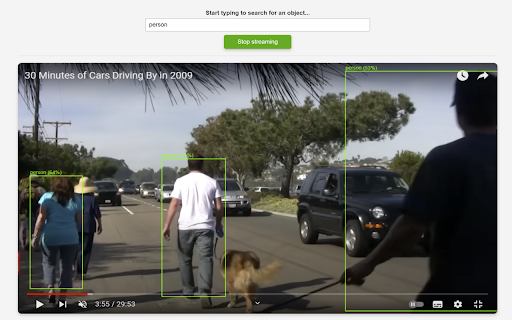
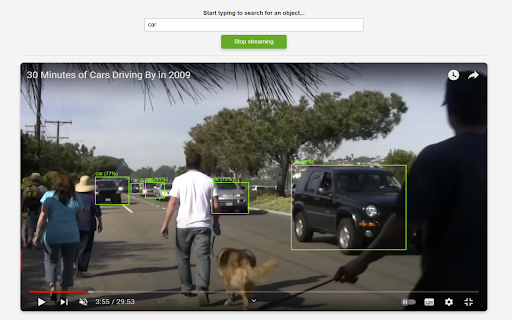
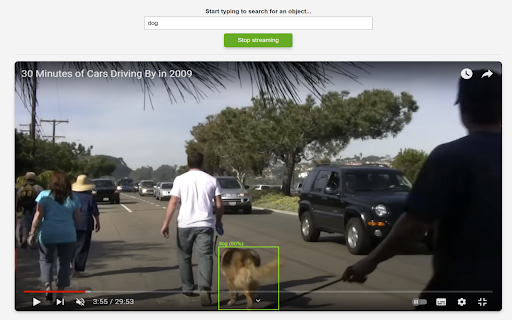
An extension to perform object detection on any shared screen.
Real-Time Object Detection for Video Feeds
This Chrome extension brings computer vision technology directly to your browser. It empowers you to analyze and monitor your video feeds without compromising your personal data. You can use it on any CCTV feed that you receive in your browser.
Features:
Instant Object Detection: you can seamlessly share any screen containing a video feed and instantly detect objects in real-time. Select an object of interest from an intuitive dropdown menu, and this extension will highlight its presence within the video.
Private and Secure: Your video feeds remain exactly that—yours. The extension performs all object detection computations within your browser, meaning your data is never sent to external servers. This ensures complete privacy and security, allowing you to confidently use the extension in any setting.
Seamless Screen Integration: Video Object Detection integrates smoothly with your Chrome browser, allowing you to share and analyze any screen with a video feed. Whether it’s a live stream, a recorded video, or a conference call, Video Object Detection is your go-to tool for real-time object detection.
No Data Collection: Video Object Detection is built with privacy at its core. All processing happens locally in your browser, ensuring that no personal data, video feeds, or object detection results are ever collected, stored, or transmitted.
Simple, Intuitive Interface: Video Object detection is designed for ease of use. Its clean, user-friendly interface makes it accessible to everyone, regardless of technical expertise. You can start detecting objects in your video feeds with just a few clicks.
| 分类 | ♿无障碍访问 |
| 插件标识 | igoognpcnlilhlpjmedmicfggehaegck |
| 平台 | Chrome |
| 评分 |
★★★☆☆
3.9
|
| 评分人数 | 7 |
| 插件主页 | https://chromewebstore.google.com/detail/video-object-detection/igoognpcnlilhlpjmedmicfggehaegck |
| 版本号 | 1.1 |
| 大小 | 666KiB |
| 官网下载次数 | 71 |
| 下载地址 | |
| 更新时间 | 2024-09-17 00:00:00 |
CRX扩展文件安装方法
第1步: 打开Chrome浏览器的扩展程序
第2步:
在地址栏输入: chrome://extensions/
第3步: 开启右上角的【开发者模式】
第4步: 重启Chrome浏览器 (重要操作)
第5步: 重新打开扩展程序管理界面
第6步: 将下载的crx文件直接拖入页面完成安装
注意:请确保使用最新版本的Chrome浏览器
同类插件推荐

SFMC OBJECT FINDER
SFMC OBJECT FINDERSFMC Object Finder Article - htt
Video Object Detection
An extension to perform object detection on any sh
YouTube™ motion tracking
AI extension for motion animation in YouTube™ vide

YouTube Only What You Search
Youtube rendered only with the search results with

Youtube filter
Filters youtube recommendations by lengthFilters y

HTML5 Video Tag Enhancer
Color Adjustment/10Band EQ/Chorus/Delay/Reverb/Pla

网络视频速度控制器
使用我们的视频速度控制器,加快或减慢任何网站上在线视频的播放速度大多数 HTML 播放器不允许您调整

Google Chrome™的页面标记
在选项卡屏幕快照上绘制矢量图形。安装此扩展程序后,可直接在任何网页上绘制。 是否需要一种快速的方法

YouTube Search Tornado
Search videos from playlists by video title, descr
Video Duration for YouTube™
Adjust YouTube video playback speed, save time, an

Time machine
Erase browser history and cookies with one click,

Time Travel
Fake the current date and time in JavaScript Date