
Extractify Chrome 插件, crx 扩展下载
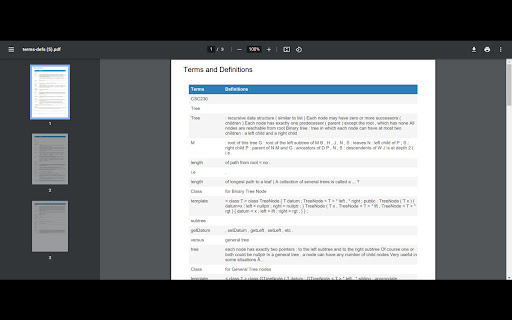
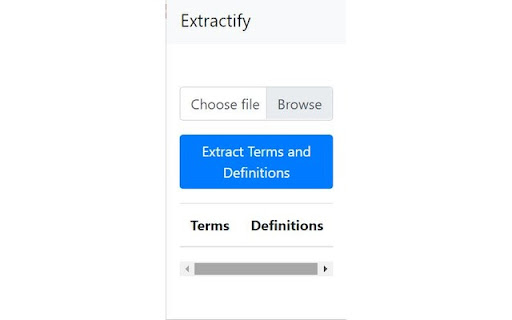
Extracts terms and definitions from a PowerPoint file
Extractify is the ultimate tool for students looking to easily extract and organize key terms and definitions from their class readings and study materials.
Extractify makes it simple to quickly pull important information from your lecture slides and study more efficiently.
Upload your .pptx file and Extractify does the rest by automatically recognizing terms and definitions for you!
Say goodbye to tedious manual highlighting and note-taking - Extractify does the heavy lifting for you. Plus, with the option to export your extracted information as a .pdf file, you can seamlessly integrate Extractify into your existing study workflow.
Don't waste any more time sifting through pages of irrelevant information - install Extractify today and take control of your studying.
| 分类 | ♿无障碍访问 |
| 插件标识 | ijkeendgbdgeajadokijhjhdbeicmbfe |
| 平台 | Chrome |
| 评分 |
☆☆☆☆☆
0
|
| 评分人数 | 1 |
| 插件主页 | https://chromewebstore.google.com/detail/extractify/ijkeendgbdgeajadokijhjhdbeicmbfe |
| 版本号 | 0.0.0.4 |
| 大小 | 476KiB |
| 官网下载次数 | 50 |
| 下载地址 | |
| 更新时间 | 2023-04-19 00:00:00 |
CRX扩展文件安装方法
第1步: 打开Chrome浏览器的扩展程序
第2步:
在地址栏输入: chrome://extensions/
第3步: 开启右上角的【开发者模式】
第4步: 重启Chrome浏览器 (重要操作)
第5步: 重新打开扩展程序管理界面
第6步: 将下载的crx文件直接拖入页面完成安装
注意:请确保使用最新版本的Chrome浏览器
同类插件推荐

Nexweave - LinkedIn AI Messages
Revamp your LinkedIn outreach with customized visu
Stopwatch for Excel
Adds a stopwatch to Excel.This extension adds a st
Twitter Long Text Editor
Twitter Long Text Editor converts the input Rich L

Taplio for Twitter
Taplio for Twitter: Elevate your twitter influence
Extractify
Extracts terms and definitions from a PowerPoint f

SummarAI
Slicing Through Information OverloadIntroducing Su

Airbnb Review Summarizer
Summarize Airbnb reviews to be usefulRenters don&#

SummaryGPT
Summarize webpages using OpenAI's API# Summary

Chatin for Problem Analysis
This extension enables Design Science Research thr

New Reddit comment faces
Renders comment faces, spoiler codes, and other ol

Left Unread
Show only unread conversations on Facebook, Messen

Agency Toolchest
The Agency Toolchest Chrome Extension is used to s

ReadAnything
Read anything with the power of AIAre you bothered