
Bandlab For PC, Windows, and Mac Download Chrome 插件, crx 扩展下载
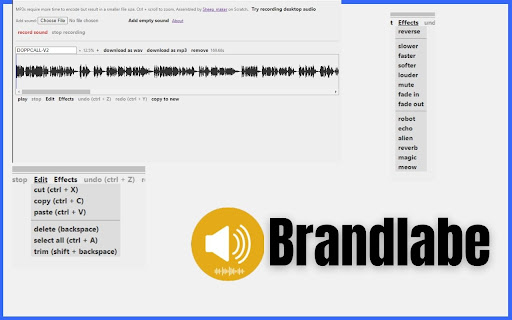
Get Bandlab for PC, Windows, and Mac extension to bring an amazing audio editor with just one click.
Brandlab for PC, Windows, and Mac extension is a game-changer for audio enthusiasts and content creators seeking a seamless audio editing solution. Whether you're recording desktop audio, uploading your own sound files, or add sound effect this extension empowers you to create and refine audio effortlessly.
With Brandlab extnesion, you can duplicate videos, utilize essential editing tools like cut, copy, paste, delete, and trim, and experiment with an impressive selection of nearly 14 audio effects.
✔️Features:
- You can direct record from desktop audio
- You can upload your own audio
- Video Duplicate
- Cut, Copy, Paste , Delete, and Trim Features
- Almost 14 Audio Effects
- Download as WAV
- Download as Mp3
- Remove Feature
✔️Keyboard Shortcuts:
To utilize these shortcuts, ensure that you have focused on a sound editor. You can set the focus by clicking on the editor. The command key is also compatible with the Ctrl shortcuts.
Space: Play/Stop
Backspace or Delete: Delete
Ctrl + A: Select All
Ctrl + X: Cut
Ctrl + C: Copy
Ctrl + V: Paste
Ctrl + Z: Undo
Ctrl + Y or Ctrl + Shift + Z: Redo
Ctrl + S: Download as WAV
Ctrl + Alt + S: Download as MP3
Left/Right Arrow Key: Move Cursor/Selection Left/Right
Shift + Left/Right Arrow Key: Select Left/Right
Ctrl + Left/Right Arrow Key: Go to Beginning/End
Ctrl + Shift + Left/Right Arrow Key: Select from Beginning/To End
✔️How to Use Brandlab Extension:
Step 1: Add the Brandlab for PC, Windows, and Mac extension to your Google Chrome browser.
Step 2: Click on the extension icon, and you will see the Brandlab Audio Editor in your browser.
Step 3: Upload your audio or record audio from the desktop.
Step 4: Utilize options like Cut, Copy, Paste, Delete, Trim Features, and choose from nearly 14 audio effects and more.
Step 5: Enjoy!
✔️About the this audio editor extension:
One common complaint about Scratch 3.0 is that its rewritten sound editor has fewer features compared to Scratch 2.0. Some code has been borrowed from Scratch 3.0's open source repositories, including scratch-gui, scratch-audio, and possibly scratch-vm. Additionally, certain dependencies have been used, such as wav-encoder, startaudiocontext, getFloatTimeDomainData, get-user-media-promise, and possibly one more, though I cannot recall. Lamejs has also been utilized for downloading audio as an MP3.
Disclaimer:
Please note that "Brandlab for PC, Windows, and Mac" Chrome Extension is an independent product and is not associated, affiliated, or endorsed by the PicsArt Android app or its developers. We respect intellectual property rights and make no claim to any copyrights associated with the KineMaster Android app.
| 分类 | 🛠️工具 |
| 插件标识 | ilhlmplcclmdaiabhnljpbambhbnfcha |
| 平台 | Chrome |
| 评分 |
☆☆☆☆☆
0
|
| 评分人数 | 4 |
| 插件主页 | https://chromewebstore.google.com/detail/bandlab-for-pc-windows-an/ilhlmplcclmdaiabhnljpbambhbnfcha |
| 版本号 | 1.0.0 |
| 大小 | 501KiB |
| 官网下载次数 | 3000 |
| 下载地址 | |
| 更新时间 | 2023-10-09 00:00:00 |
CRX扩展文件安装方法
第1步: 打开Chrome浏览器的扩展程序
第2步:
在地址栏输入: chrome://extensions/
第3步: 开启右上角的【开发者模式】
第4步: 重启Chrome浏览器 (重要操作)
第5步: 重新打开扩展程序管理界面
第6步: 将下载的crx文件直接拖入页面完成安装
注意:请确保使用最新版本的Chrome浏览器
同类插件推荐

Sound Tool
Advanced tool for composing synthetic musicHTML5 s
BandLab Music Downloader
Download tracks/m4a/sound/video/mp4 from BandLabKe

BandLab音乐下载助手
欢迎使用 BandLab 音乐视频下载工具!本工具可以帮助您下载 BandLab 上的音频和视频内容
Bandlab For PC, Windows, and Mac Download
Get Bandlab for PC, Windows, and Mac extension to
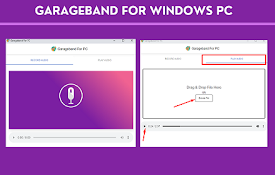
GarageBand for windows PC, Mac- Free Download
GarageBand for windows PC extensions, comes with P
Song Maker Toolkit
Quality of life features for Chrome Music Lab: Son
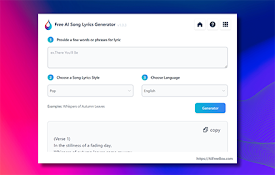
AI歌词生成器 - 创作独特歌词
免费AI歌词生成器:用我们的AI作词师释放您的内在艺术家,仅用几秒钟就能创作出引人入胜、独特的说唱歌
Tonalis Audio Recorder
Tonalis Audio Recorder Redefines Tab Audio, Mic Re

Stem Splitter for Udio and Suno Songs
Enhance your music experience with this Stem Split

AudioCloud 音频编辑器,用于录制、剪切、粘贴、修剪音频部分
修剪、剪切、粘贴或应用压缩、混响、延迟和失真效果等音频效果AudioCloud 音频编辑器是一个扩展
音调发生器
使用音调发生器作为频率生成器或声波创作者来制作精确的音调。非常适合调音和音频测试!? 用音调发生器改

Drum Pads 24: Beatmaker
Make beats and music by tap pads with mouse or key

Rap Instrumentals - The Corporatethief Beats
This extension will showcase hip hop instrumentals