
ChatGPT2Notion Chrome 插件, crx 扩展下载
copy chatgpt info to notion
You can easy copy ChatGPT prompt and response to notion database easily and fast by the extension.
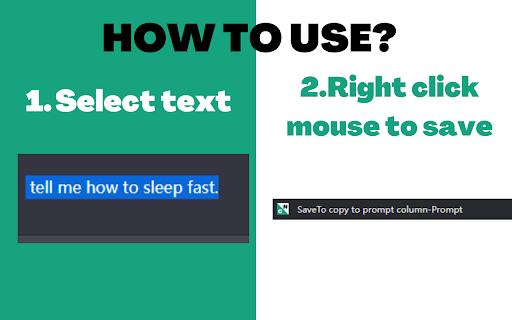
How to use?
1. Select text
2. Right click your mouse
3. Copy to notion database(table).
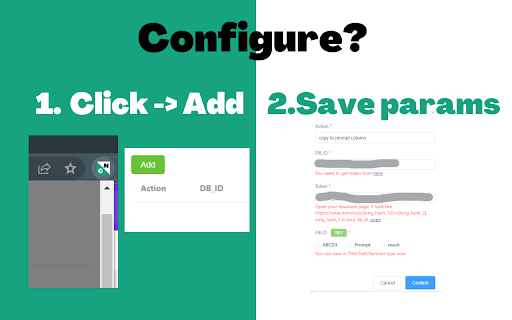
How to configure the extension?
1. Click the extension button.
2. Add a action.
3. Add your aciton name whiich will show when you click right your mouse in the website page.(edit it like: copy to prompt Or copy to result)
4. Add your DB_ID
5. Add your Token
6. Click get button and choose the column.
7. Click confirm button.
You need to get token from:
https://www.notion.so/my-integrations
add a new integration and get your own token.
Add this new connection in Notion's setting list.
You need to get DB_ID from looking the Notion page in website url bar:
https://www.notion.so/[long_hash_1]?v=[long_hash_2]
long_hash_1 is your db_id.
| 分类 | 📝工作流程与规划 |
| 插件标识 | ipdnfkmaglemjkahocbekijaobdolefb |
| 平台 | Chrome |
| 评分 |
★★★★☆
4.7
|
| 评分人数 | 436 |
| 插件主页 | https://chromewebstore.google.com/detail/chatgpt2notion/ipdnfkmaglemjkahocbekijaobdolefb |
| 版本号 | 1.0.0 |
| 大小 | 855KiB |
| 官网下载次数 | 23 |
| 下载地址 | |
| 更新时间 | 2023-02-19 00:00:00 |
CRX扩展文件安装方法
第1步: 打开Chrome浏览器的扩展程序
第2步:
在地址栏输入: chrome://extensions/
第3步: 开启右上角的【开发者模式】
第4步: 重启Chrome浏览器 (重要操作)
第5步: 重新打开扩展程序管理界面
第6步: 将下载的crx文件直接拖入页面完成安装
注意:请确保使用最新版本的Chrome浏览器
同类插件推荐
ChatGPT2Notion
copy chatgpt info to notionYou can easy copy ChatG

保存 ChatGPT DALL·E-3 对话记录到 Notion
一键保存 ChatGPT 对话到 Notion。导出 ChatGPT 对话ChatGPT保存到Not

Chat GPT Scroll Map
A minimap for scrolling through chat gpt messages,

Pinnable ChatGPT:在侧边栏中钉选 GPT 对话
在侧边栏中钉选 ChatGPT 对话以便快速访问置顶对话将始终保持在顶部,便于快速访问。 Pinn