
Atila Scholarship Helper Chrome 插件, crx 扩展下载

Save scholarship you're interested in, get reminded when a scholarship is due, add notes and more
The Atila Scholarship Helper Chrome Extension allows you to easily save any scholarships you find on the internet. Get reminded when a scholarship is due, add notes, and export to Google Sheets and Calendar so you never forget a deadline.
Key Features:
Bookmark: Save scholarships from any website.
When you come across a website you're interested in, instead of opening up a spreadsheet or word document or saving it across multiple bookmarks, this extension allows you to save a scholarship and it's relevant details in just one click.
All saved scholarships automatically saved to the Atila website.
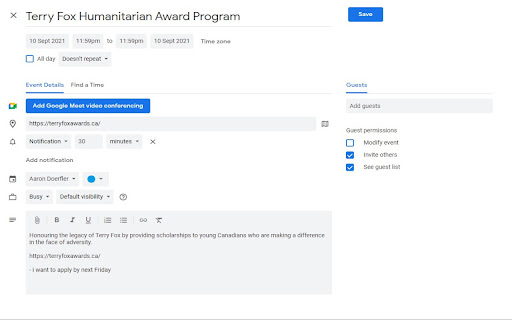
Save to Calendar: Easily add the saved scholarships to your Google Calendar.
Save scholarships that you're interested in directly from the scholarship site directly. Get reminded when a scholarship is due through Google Calendar, and add notes to help you organize the scholarships or as a reminder for what to include in your application.
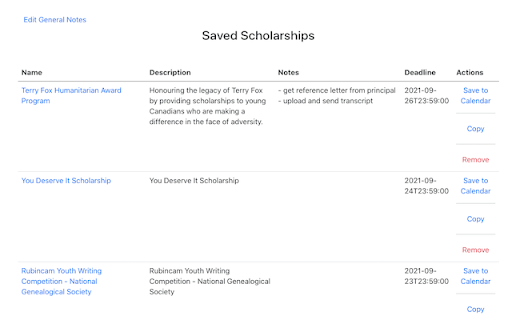
Edit: Update scholarship description and notes through an easy to use interface.
Our interface shows you all the scholarships which you've saved in an easy to navigate table. The table allows you to easily edit the description and notes so you remember to include all the small details to help you write the best scholarship applications possible!
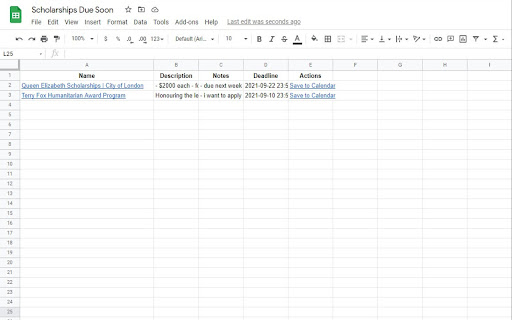
Export: Transfer your saved scholarships to other places like a spreadsheet, word document, etc.
You can export it to a fresh Google Sheets spreadsheet to help you visualize all of your deadlines.
| 分类 | 📝工作流程与规划 |
| 插件标识 | ippmodhmgofpojbjjcgpjelghailjomm |
| 平台 | Chrome |
| 评分 |
☆☆☆☆☆
0
|
| 评分人数 | 1 |
| 插件主页 | https://chromewebstore.google.com/detail/atila-scholarship-helper/ippmodhmgofpojbjjcgpjelghailjomm |
| 版本号 | 1.1.4 |
| 大小 | 943KiB |
| 官网下载次数 | 83 |
| 下载地址 | |
| 更新时间 | 2022-12-16 00:00:00 |
CRX扩展文件安装方法
第1步: 打开Chrome浏览器的扩展程序
第2步:
在地址栏输入: chrome://extensions/
第3步: 开启右上角的【开发者模式】
第4步: 重启Chrome浏览器 (重要操作)
第5步: 重新打开扩展程序管理界面
第6步: 将下载的crx文件直接拖入页面完成安装
注意:请确保使用最新版本的Chrome浏览器
同类插件推荐

The Scholarship System
Imports scholarship details into user's accoun
Atila Scholarship Helper
Save scholarship you're interested in, get rem

Scholarship websites
List of websites post scholarshipsList of the popu

Irregular Verbs List
Irregular Verbs Listthis extension contains the li

BookBuyer
Allows for quick searching of goodread books on an

Focus Trainer
Tool to train your focus & become aware of whe

Textomap: Generate maps from text in seconds
Create maps in the same tab as you browse websites

Skeptic AI - ChatGPT Bias Analysis
Evaluate biases, quality and reliability of your l

Youtube Ultimate Search
Discover precise moments within YouTube videos wit

ChatGPT Perplexity Google AI Chat Search
Search multiple AI search Engines and best AI chat

RenderGPT
A Chrome extension to render HTML/JavaScript/CSS f

GitHub similar repository suggestions
It shows the similar repositories to the one which

Cleaner Reddit
This extensions allows user to disable Reddit'