Vs Code github Chrome 插件, crx 扩展下载
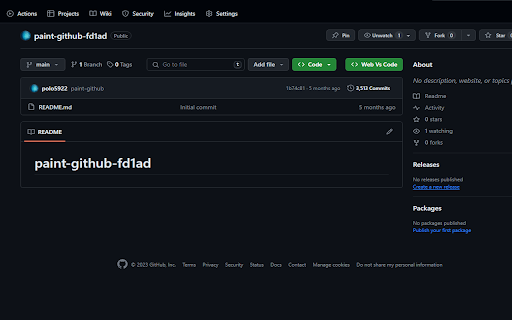
Extention chrome for adding vscode button in github
The GitHub Open Button for Chrome extension revolutionizes your workflow by seamlessly integrating Visual Studio Code Web (VS Code Web) with GitHub. This Chrome extension places an "Web Vs Code" button right on GitHub repositories, transforming your browsing experience into a coding journey.
Key Features:
Streamlined Workflow: Access your GitHub repositories in VS Code Web with a single click, eliminating the need for manual URL copying and pasting.
Productivity at Its Best: Stay within your coding environment to boost productivity and minimize distractions.
Open Source: This extension is open-source, empowering you to contribute to its development and tailor it to your unique needs.
How to Use:
Install the "Vs Code github for Chrome" extension from the Chrome Web Store.
Sign in to your GitHub account if prompted.
Visit any GitHub repository in your Chrome browser.
Look for the "Web Vs Code" button on the repository page.
Click the button to open the repository directly in Visual Studio Code Web.
Start coding immediately in a familiar and focused environment.
Stay Connected:
Elevate Your VS Code Web Experience:
With the Vs Code github for Chrome extension, simplify your interactions with GitHub and elevate your coding experience in the browser.
| 分类 | 💻开发者工具 |
| 插件标识 | jajpeoodgnclcpkcldfieifkcinhcnmg |
| 平台 | Chrome |
| 评分 |
★★★★☆
4.9
|
| 评分人数 | 33 |
| 插件主页 | https://chromewebstore.google.com/detail/vs-code-github/jajpeoodgnclcpkcldfieifkcinhcnmg |
| 版本号 | 0.1.0 |
| 大小 | 85.21KiB |
| 官网下载次数 | 55 |
| 下载地址 | |
| 更新时间 | 2023-12-14 00:00:00 |
CRX扩展文件安装方法
第1步: 打开Chrome浏览器的扩展程序
第2步:
在地址栏输入: chrome://extensions/
第3步: 开启右上角的【开发者模式】
第4步: 重启Chrome浏览器 (重要操作)
第5步: 重新打开扩展程序管理界面
第6步: 将下载的crx文件直接拖入页面完成安装
注意:请确保使用最新版本的Chrome浏览器