
Resources downloader Chrome 插件, crx 扩展下载
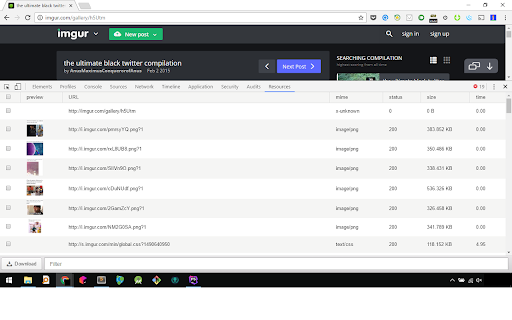
Download the resources displayed on a page easily!
List and save the images, gifs, videos, music displayed in your browser. Works with most websites like imgur, 4chan and reddit.
Resource Downloader adds a panel to DevTools, right-click on your page, select "Inspect", click on the "Resources" tab and you're set.
Reload your page and check the resources you want to download.
You can also filter and sort the resources by name, url, mime type, size etc.
| 分类 | 📝工作流程与规划 |
| 插件标识 | jdeiocmhhepbkbcmimheejheebeodbmm |
| 平台 | Chrome |
| 评分 |
★★☆☆☆
2
|
| 评分人数 | 9 |
| 插件主页 | https://chromewebstore.google.com/detail/resources-downloader/jdeiocmhhepbkbcmimheejheebeodbmm |
| 版本号 | 0.0.6 |
| 大小 | 200KiB |
| 官网下载次数 | 7000 |
| 下载地址 | |
| 更新时间 | 2022-06-01 00:00:00 |
CRX扩展文件安装方法
第1步: 打开Chrome浏览器的扩展程序
第2步:
在地址栏输入: chrome://extensions/
第3步: 开启右上角的【开发者模式】
第4步: 重启Chrome浏览器 (重要操作)
第5步: 重新打开扩展程序管理界面
第6步: 将下载的crx文件直接拖入页面完成安装
注意:请确保使用最新版本的Chrome浏览器
同类插件推荐

DevTools - Sources downloader
DevTools downloaderThis extension adds a button in

Asset Downloader
Lets you view and download all images, fonts, styl

Resources Saver
Save all of a webpage's files while retaining
Resources downloader
Download the resources displayed on a page easily!
下载网页所有资源
下载网页所有资源,包含html、css、javascript、images,按照网站原有目录结构下载

Just One File
保存网页可见部分到一个Html文件。看到什么样式的页面,保存的就是什么样的页面,所见即所存。保存当前

web page preserver
A web page downloader, which can save web pages to

克隆页面
浏览网页时可轻松克隆页面。让Chrome™浏览器支持克隆页面功能。 之前你可能先复制当前页面链接,
Save All Resources
Save all resources files with retaining folder str

Multi-File Downloader
Easily and quickly download multiple files from we

Single html downloader
Download as a single html file for the current pag

Save Webpages Offline As MHTML
Save offline copy of current tab as MHTML file. Ke

Save Page WE
Save a complete web page (as curently displayed) a