
Email Finder by Anymailfinder Chrome 插件, crx 扩展下载


One-Click email from Linkedin profile.
Looking for an easy and effective way to find email addresses from LinkedIn profile? The Anymail Finder Chrome Extension has you covered!
3 Simple Features You’ll Love
1. ? Extract individual LinkedIn profile emails
For example, search for Bill gates and you’ll see a Get Email button next to his profile picture. Click that to get his email address.
2. ? Build email lists at lighting speed
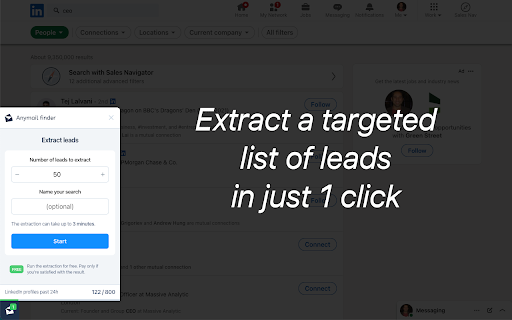
For example, search for “CEO” and Linkedin shows you hundreds of pages of CEOs. Choose how many leads you want to auto-capture emails from and hit START.
3. ? Works everywhere
Extract emails from any LinkedIn page (including Sales Navigator) and any other website.
Within the extension we provide the same core benefits that our customers have always loved: ? pay only for verified emails.
| 分类 | 📝工作流程与规划 |
| 插件标识 | jejkgijkhbdnekbbdonkikkfdmlfmdol |
| 平台 | Chrome |
| 评分 |
★★★★☆
4.4
|
| 评分人数 | 773 |
| 插件主页 | https://chromewebstore.google.com/detail/email-finder-by-anymailfi/jejkgijkhbdnekbbdonkikkfdmlfmdol |
| 版本号 | 3.0.44 |
| 大小 | 251KiB |
| 官网下载次数 | 8000 |
| 下载地址 | |
| 更新时间 | 2024-11-21 00:00:00 |
CRX扩展文件安装方法
第1步: 打开Chrome浏览器的扩展程序
第2步:
在地址栏输入: chrome://extensions/
第3步: 开启右上角的【开发者模式】
第4步: 重启Chrome浏览器 (重要操作)
第5步: 重新打开扩展程序管理界面
第6步: 将下载的crx文件直接拖入页面完成安装
注意:请确保使用最新版本的Chrome浏览器
同类插件推荐
Email Finder by Anymailfinder
One-Click email from Linkedin profile.Looking for

Hunter - Email Finder Extension
Find email addresses from anywhere on the web, wit

Email Finder-Kendo Sourcing Ninja
Find business and personal emails on Linkedin with

Email Finder - GetProspect
在几秒钟内找到电子邮件地址 - LinkedIn 的免费电子邮件查找器。 在任何网站上搜索电子邮件并