
Sentence Segmenter Chrome 插件, crx 扩展下载
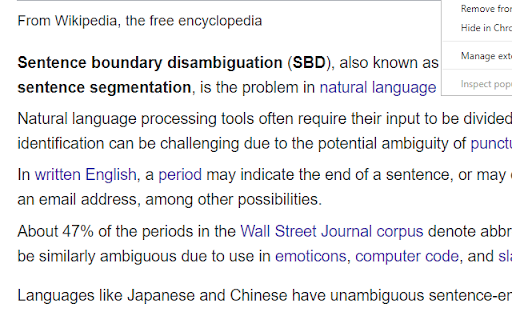
This extension will make your text easily readable by separating sentences based on periods.
This extension can help make text easier to read by putting each sentence of a webpage on a new line (separated based on periods).
You can activate the segmentation by clicking on the top-right icon.
Github:
https://github.com/AhmadHassanAwan/Sentence-Segmentation
If you need to reread, it can be faster to find the beginning of sentences that all start on the left.
Sentence structure can also become clearer.
If you’re skimming, you can abandon a sentence, and quickly find another sentence.
---
**Additional notes**
Segmenting a page is like creating a snapshot.
Certain elements can't be clicked on and expanded anymore, like comment threads.
Expand first if necessary, and then segment.
You can refresh the page to turn off the segmentation effect.
Spacing between sentences is similar to the Microsoft Word setting:
Microsoft Word -> Home -> Paragraph -> Indents and Spacing -> Spacing ->
Line spacing single
Before After 6 pt
To create a shortcut that activates the sentence segmenter, go to the extensions page (chrome://extensions/), and click on Keyboard Shortcuts at the bottom.
---
**Period double-space option**
In addition to replacing "period" "space" with "period" "new-line", you can replace with "period""space""space".
Right-click the icon, and go to "options".
An eye-tracking study found that text was easier to read when periods were followed by two spaces.
https://www.reddit.com/r/science/comments/8fl3p7/an_eyetracking_study_found_that_text_was_easier/
> Although comprehension was not affected by punctuation spacing, the eye movement record suggested that initial processing of the text was facilitated when periods were followed by two spaces, supporting the change made to the APA Manual.
https://link.springer.com/article/10.3758%2Fs13414-018-1527-6
| 分类 | ♿无障碍访问 |
| 插件标识 | jfbhkblbhhigbgdnijncccdndhbflcha |
| 平台 | Chrome |
| 评分 |
★★★☆☆
3.9
|
| 评分人数 | 27 |
| 插件主页 | https://chromewebstore.google.com/detail/sentence-segmenter/jfbhkblbhhigbgdnijncccdndhbflcha |
| 版本号 | 1.6.8 |
| 大小 | 38.34KiB |
| 官网下载次数 | 388 |
| 下载地址 | |
| 更新时间 | 2022-11-04 00:00:00 |
CRX扩展文件安装方法
第1步: 打开Chrome浏览器的扩展程序
第2步:
在地址栏输入: chrome://extensions/
第3步: 开启右上角的【开发者模式】
第4步: 重启Chrome浏览器 (重要操作)
第5步: 重新打开扩展程序管理界面
第6步: 将下载的crx文件直接拖入页面完成安装
注意:请确保使用最新版本的Chrome浏览器
同类插件推荐

WaspLine Reader
Read faster using color gradientsMake reading long

Readio Speed Reader
A modern, intuitive speed reader that just works.R

Narrower
Add margins to wide pages.Narrower is a simple ext

Breakup
Breaks up walls of text into readable paragraphs,
Columns
Read your websites more relaxed with automatic col

Hover Highlighter
Temporary text highlighting for faster readingRead
Sentence Segmenter
This extension will make your text easily readable

3read
3read allows you to read selected text in 3 dimens

Readily
Reading Made EasierRead the way you want. Readil

Scroll Preview
Scroll Preview integrates a whole-page preview wit

Turbo Outliner
Most accurate web article table of contents genera

Read Pro
A powerful browser extension to enhance web readab

Sleek Read
A better, smarter and more readable web.Sleek read