
Mixcloud (with) Tracklist Chrome 插件, crx 扩展下载
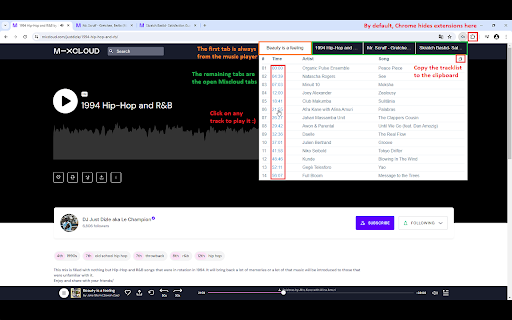
Display tracklists on Mixcloud
- Displays tracklists for Mixcloud Website.
- Plays any track directly by clicking on its timestamp.
- You can copy tracklist to clipboard.
- You can display tracklists from multiple Mixcloud pages.
General Limitations:
- Tracklists and timestamps are available only when the mix uploader has provided them.
- Don't work on mobile website (m.mixcloud.com). Mixcloud has limited its functionality, encouraging users to migrate to the mobile app. Therefore mobile website version is not scheduled for implementation.
Select Track Playing Limitations
- Playing a track in the media player only works for tracks with an available timestamp.
- You can't launch a new mix from the extension tabs. You must do it through the Mixcloud interface.
Privacy Policy
No personal info is used/collected.
Changelog
5.0.3
Fix : The tracklist display for the currently playing mix was broken.
5.0.2
- Fix wrong tracklist display when the tracklist information has not been entered into the correct field by the mix author.
- Security update.
5.0.1
Improves accessibility (colors & screen reader behaviour).
5.0.0
Multi-Tab Display: View tracklists from multiple Mixcloud tabs at once with our new Multi-Tab Tracklist feature.
Tech Upgrades: We've upgraded to Vue 3 and Webpack 5 for improved performance and stability.
4.0.0
Technical migration to manifest V3.
Artist and song inverted in tracklist template
3.0.0
Mixcloud (with) Tracklist v3 (Redesign due to Mixcloud breaking changes)
Now Tracklist is displayed in Extension popup
2.3.4
Due to some changes on Mixcloud Website, this extension is currently broken.
Fix release is scheduled for the end of January. See https://github.com/trepDev/mixcloud-with-tracklist/issues/33 for more details.
2.3.3
- Fix WebExtension due to html modifications on Mixcloud website.
2.3.2
- Fix Extension due to modifications made on the website (API url).
2.3.1
- Fix Style with new Mixcloud CSS classes
- Move tracklist button before "More" button
- Remove click on track title. It was annoying if you just wanted to highlight it (for instance to copy it)
2.3.0
Mixcloud Website design and GraphQL API has changed (June 2023).
As a result Mixcloud (with) Tracklist Extension is broken.
This version 2.3.0 fixes everything.
2.2.0
- Add copy to clipboard functionality (for Tracklist)
2.1.0
- Fix select track playing feature
- New design for tracklist
- Vuejs under the hood (instead of Mustache)
2.0.0
- Add time display
- Add select track playing feature
- Rework settings (replace tracklist default behaviour by TrackNumber/Time display default behaviour)
- Correct display bugs with select profile
1.0.1
- Fix potential security issue
- Fix display bug on tracklist button
| 分类 | ♿无障碍访问 |
| 插件标识 | jgghogcekaldifaiifpnbfnpmmpiengb |
| 平台 | Chrome |
| 评分 |
★★★☆☆
3.6
|
| 评分人数 | 5 |
| 插件主页 | https://chromewebstore.google.com/detail/mixcloud-with-tracklist/jgghogcekaldifaiifpnbfnpmmpiengb |
| 版本号 | 5.0.3 |
| 大小 | 64.94KiB |
| 官网下载次数 | 1000 |
| 下载地址 | |
| 更新时间 | 2025-02-22 00:00:00 |
CRX扩展文件安装方法
第1步: 打开Chrome浏览器的扩展程序
第2步:
在地址栏输入: chrome://extensions/
第3步: 开启右上角的【开发者模式】
第4步: 重启Chrome浏览器 (重要操作)
第5步: 重新打开扩展程序管理界面
第6步: 将下载的crx文件直接拖入页面完成安装
注意:请确保使用最新版本的Chrome浏览器
同类插件推荐

Beatport Grabber
Extension for cataloging and saving your favorite
Mixcloud (with) Tracklist
Display tracklists on Mixcloud- Displays tracklist

Mixcloud Tracklist
Display tracklists on MixcloudThis is an unofficia

GreatDJ
This extension automatically saves all the playlis

SoundQ
SoundCloud QueueIf you ever wanted to queue songs

SoundFilter
Remove reposts from soundcloud feed.Sometimes ther

Soundcloud Cleaner
Randomly removes some reposts from the soundcloud

Quick Preview for SoundCloud
Hover the ▶️ Button to Preview Music on SoundCloud

SoundCloud Player
SoundCloud Popup Player ?Control your audio with e

Odesli for Bandcamp
Open Bandcamp album on every streaming platform. P
Discogs Enhancer
Enhance your Discogs experience with dark themes,

Bandcamp Feed Playlist
Play all of your feed in one click.This is a lazy
Discogs Sort Plus
Adds missing Discogs sort features: community rati