
Autoclick Chrome 插件, crx 扩展下载
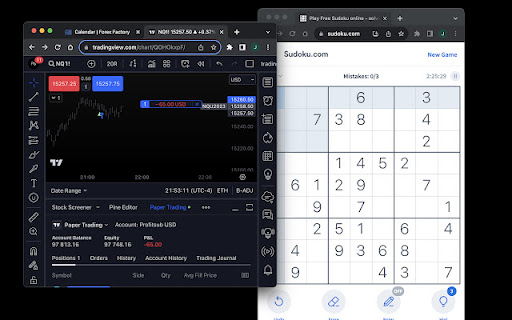
A Chrome extension to automate buy, sell, or close actions on TradingView based on alerts.
Special Offer: Free for a Limited Time
Don't want to mess with webhooks and APIs? Run a simple strategy on a single instrument with an integrated broker? Autoclick is for you. Automate your trades directly from TradingView alert pop-ups with Autoclick. Exclusive to TradingView users.
How Autoclick Works:
Setup:
-- Install Autoclick.
-- If prompted, enter the license key from your receipt email.
-- Toggle 'on' to start automation or 'off' to pause without stopping alerts.
In TradingView:
-- Select the chart where you plan to execute trades.
Alert Configuration:
-- Use the provided syntax to format your alert message.
-- Make sure 'Show pop-up' in Notifications is enabled.
Trading Settings:
-- Right-click on the chart to access settings.
-- Enable 'buy' and 'sell' options.
-- Choose 'instant order placement.'
-- Set your desired order size at the top left.
Broker Connection:
-- Connect your broker via the trading panel.
-- Paper trading option also available.
Autoclick allows you to automate trades even if your monitor is off. Toggle alerts on and off using your mobile for versatile strategies.
For advanced trading scripts, visit profitsub.com and explore Superscript.
Autoclick 2.0 Syntax Guide:
Commands:
-- "Buy"
-- "Sell"
-- "Close"
-- "Close Buy" (Reverses Sell)
-- "Close Sell" (Reverses Buy)
Modifications:
-- Add these elements for control:
--- Quantity: q=integer, oq=integer, cq=integer
--- Take Profit: tp=price
--- Stop Loss: sl=price
Get a License: Visit profitsub.gumroad.com/l/autoclick
Note: Autoclick is free for a limited time.
| 分类 | 📝工作流程与规划 |
| 插件标识 | jhodlohkfkffmmbgeppchmbnbbcmnkeh |
| 平台 | Chrome |
| 评分 |
★★☆☆☆
2
|
| 评分人数 | 22 |
| 插件主页 | https://chromewebstore.google.com/detail/autoclick/jhodlohkfkffmmbgeppchmbnbbcmnkeh |
| 版本号 | 2.1 |
| 大小 | 10.66KiB |
| 官网下载次数 | 371 |
| 下载地址 | |
| 更新时间 | 2023-10-15 00:00:00 |
CRX扩展文件安装方法
第1步: 打开Chrome浏览器的扩展程序
第2步:
在地址栏输入: chrome://extensions/
第3步: 开启右上角的【开发者模式】
第4步: 重启Chrome浏览器 (重要操作)
第5步: 重新打开扩展程序管理界面
第6步: 将下载的crx文件直接拖入页面完成安装
注意:请确保使用最新版本的Chrome浏览器
同类插件推荐
Autoclick
A Chrome extension to automate buy, sell, or close

Auto Clicker
Just click automationThis extension is a straightf

OP Auto Clicker
A full-fledged autoclickerNote: Only some web page

Autoclicker
Automatically click on element matching search cri

Auto Clicker
The top-rated free auto clicker Chrome Extension f

Easy Auto Clicker
A free auto clicker which will easy to solve all y
![自动点击器 - 自动填充 [BETA]](https://www.chajianmi.com/images/rDSrt9O99NK3tjQWWqxNZj0E1v-BR9flICjkMr04JMbsIpj6MNtOHi7gm9WugvIK8i8aLZXulcu-ccUpuNLvneBv1g=s275-w275-h175)
自动点击器 - 自动填充 [BETA]
自动填充输入字段或自动点击按钮或链接任何地方。您可以配置并检查点击速度测试欢迎使用 Auto Cli

Auto Clicker
Automate ClicksAutoClicker designed to automate re
Auto Click Scheduler - FoxyClick
Just right click on any element and set a timer. E

Cookie Clicker Fair Auto Clicker
Fair Auto Clicker for Auto Clicker. Hold Mouse1 on

Alert Detector TTA
Send a post request to anywhere you want when an a

ChatGPT AutoClick Continue
ChatGPT AutoClick Continue is a browser extension

自动点击器 - 自动填充器
自动填充输入字段或自动点击按钮或链接任何地方。您可以配置并检查点击速度测试مرحبًا بك في