
Recent Bookmarks Chrome 插件, crx 扩展下载
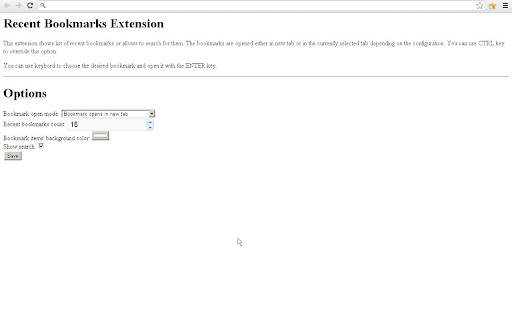
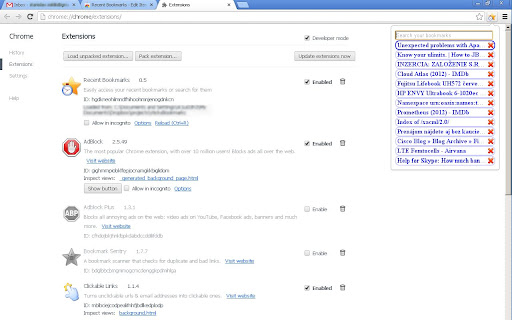
Easily access your recent bookmarks or search for them
Shows recent bookmarks and opens it either in new tab or in actual tab depending on the chosen options (use CTRL to override this).
You can use default shortcut Ctrl+B to open popup menu
Unfortunately shortcut works only for new installation due to bug https://code.google.com/p/chromium/issues/detail?id=336420
For old user update shortcut manually via "Keyboard shortcuts" in chrome://extensions/ page
First version published in 2010.
| 分类 | 📝工作流程与规划 |
| 插件标识 | jiccoelcmhpbnpalcgfoppfmhehogdbl |
| 平台 | Chrome |
| 评分 |
★★★☆☆
3.2
|
| 评分人数 | 5 |
| 插件主页 | https://chromewebstore.google.com/detail/recent-bookmarks/jiccoelcmhpbnpalcgfoppfmhehogdbl |
| 版本号 | 88.0 |
| 大小 | 320KiB |
| 官网下载次数 | 793 |
| 下载地址 | |
| 更新时间 | 2023-12-10 00:00:00 |
CRX扩展文件安装方法
第1步: 打开Chrome浏览器的扩展程序
第2步:
在地址栏输入: chrome://extensions/
第3步: 开启右上角的【开发者模式】
第4步: 重启Chrome浏览器 (重要操作)
第5步: 重新打开扩展程序管理界面
第6步: 将下载的crx文件直接拖入页面完成安装
注意:请确保使用最新版本的Chrome浏览器
同类插件推荐

Bookmarks by Date
Displays a list of bookmarks in descending order f

Starmarks Bookmark Manager
Unleash the power of your bookmarks! Effortlessly
Recent Bookmarks
Easily access your recent bookmarks or search for

Sprucemarks
Automatically sort bookmarks by title, date, or UR

Recursive Bookmark Sorter
Sort your bookmarks recursive## Sort your chrome b

Recent Bookmarks
A list of recent bookmarks in descending order, gr

Cool Bookmarks
A simple bookmark manager for ChromeFEATURES - add

Bookmarks by date
Bookmark all opened tabs in a folder with current

Bookmarks Reorderer
Moves created bookmarks to the top of their folder

Better Bookmark
Easily add bookmarks to any category. Includes spo

Bookmarks HotList
A Speed Dial in your toolbar, with easy set-up and

Bookmarks Table
View your Chrome bookmarks by date in a sortable s

QuickBookmarkToFolder
Lets you quickly find a bookmark folder and save a