
Chrome extension source viewer Chrome 插件, crx 扩展下载
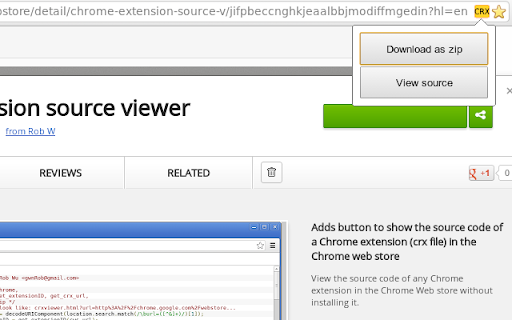
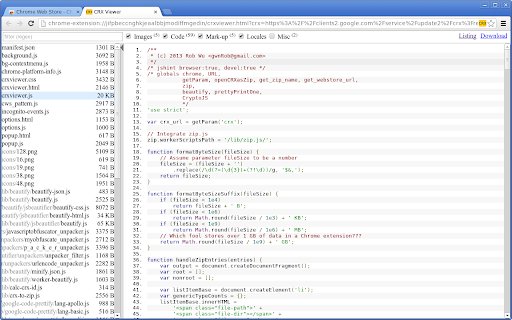
View source code of Chrome extensions, Firefox addons or Opera extensions (crx/nex/xpi) from the Chrome web store and elsewhere.
View the source code of any Chrome extension in the Chrome Web store without installing it.
Features:
- Button at the Chrome Web store
- Download extension as zip file
- View source
- Configurable via context menu on button: Set one-click action via "primary action on click".
- View source:
- File name/type filter
- Search in the file content (literal or regexp)
- Automatic beautification (formatting) of code
- Syntax highlighting
- Show hashes (md5, sha1, sha256, sha384, sha512) of individual files
- Image preview
- View embedded zip files
- View any zip file by URL or file chooser
- View source of platform-specific extensions (such as Chrome OS-only extensions, or NaCl for a different architecture).
- Permalink to file and search result within a zip or extension file.
- Full support for incognito mode.
- Outputs public key and extension ID to the console.
Optional features (see options page):
- View source of Opera 15+ extensions, Edge extensions, Firefox addons or Thunderbird add-ons.
- "View extension source" contextmenu item on links to Chrome extensions
- View source of Chrome extensions outside the webstore. The View source button becomes visible when you select a CRX file for download.
Source code: https://github.com/Rob--W/crxviewer
Online demo: https://robwu.nl/crxviewer/
Contact: [email protected]
Change log:
- 1.2.3:
Add "downloads" permission to make sure that the "Download" button always works as intended.
- 1.2.4:
Add extra parameters to the CRX URL to make sure that CRX files of extensions uploaded to the Chrome Web Store after July 2014 are correctly read.
- 1.2.6: Sync options, use optionsV2, show numeric progress instead of dots, updated JSBeautifier, restore font size.
- 1.2.7: Bugfixes (viewer height, checkbox filter).
- 1.3:
Support Firefox addons (also available as a Firefox addon!)
Search within files
Customize webstore download parameters
View embedded zip files and any zip file
- 1.3.1: Use correct URL for loading extension files.
- 1.3.2: Bugfix to allow unusual extension URLs to be opened again.
- 1.4: New syntax highlighter, improved search controls, improved word wrap.
- 1.5: Calculate hashes, add link to Github project page, bugfix for case-sensitive search.
- 1.6: Improved search highlighting & also search in beautified content.
- 1.6.2: Configurable "primary action on click", open new tab next to current tab.
- 1.6.4: Support the new CRX3 Chrome extension file format (#62).
- 1.6.6: Permalink support, Firefox add-on finder.
- 1.6.7: Fix broken extension due to bug with storage access and NativeCrxBindings.
- 1.6.8: Support CRX3 file format from CWS; support some other AMO domains.
- 1.6.9: Add option to add the context menu item to more links (#69), open new tabs via context menu next to current tab.
- 1.6.10: Improve syntax highlighting (perf, highlighting of WebAssembly source), show sum of file sizes.
- 1.6.11: Add "Extension ID" row at Analysis of manifest.json, improve CRX3 public key detection, improve zip fallback detection.
- 1.6.12: Support source viewing of Edge and Thunderbird extensions, recognize CRX3 from Opera, update beautifier.
- 1.6.13: Work around Chrome bug that broke the extension button (#120).
- 1.7.0: Support new Chrome Web Store (#134), and migrate to Manifest Version 3.
| 分类 | 💻开发者工具 |
| 插件标识 | jifpbeccnghkjeaalbbjmodiffmgedin |
| 平台 | Chrome |
| 评分 |
★★★★☆
4.9
|
| 评分人数 | 110 |
| 插件主页 | https://chromewebstore.google.com/detail/chrome-extension-source-v/jifpbeccnghkjeaalbbjmodiffmgedin |
| 版本号 | 1.7.0 |
| 大小 | 227KiB |
| 官网下载次数 | 100000 |
| 下载地址 | |
| 更新时间 | 2023-12-11 00:00:00 |
CRX扩展文件安装方法
第1步: 打开Chrome浏览器的扩展程序
第2步:
在地址栏输入: chrome://extensions/
第3步: 开启右上角的【开发者模式】
第4步: 重启Chrome浏览器 (重要操作)
第5步: 重新打开扩展程序管理界面
第6步: 将下载的crx文件直接拖入页面完成安装
注意:请确保使用最新版本的Chrome浏览器
同类插件推荐

Get CRX
Get source .crx extension file of any Chrome exten

Awesome View Source Button
Awesome button to view the source in a new window

Quick source viewer
View current page sources: HTML + Javascript + CSS

CRX Inspector
Examine the inner workings of Chrome extensions.CR

Extensions Update Notifier
Show a notification when an extension is updated.G

CRX Extractor/Downloader
Download CRX Files directly as crx or zip file dep
Chrome extension source viewer
View source code of Chrome extensions, Firefox add

Extension Source Downloader
Download the source code for chrome extensions via

JScript tricks
You can trick any page! Add your own JavaScript (p

Code Formatter
A Chrome extension to identify fonts & stlyes

OctoLinker
OctoLinker – Links together, what belongs together

View Rendered Source
View source is dead. See how the browser renders a
Save All Resources
Save all resources files with retaining folder str