
Open Links in Tabs Chrome 插件, crx 扩展下载
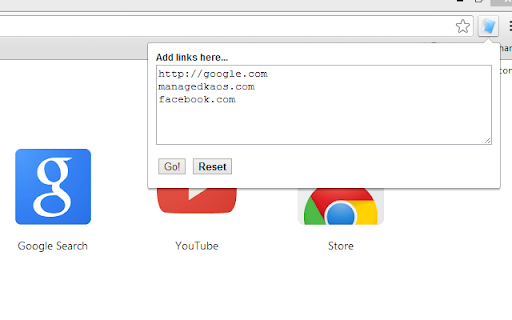
URLs entered in a form are opened in tabs.
Open Links in Tabs does just what the name says. Click the icon to activate the extension. In the form that pops up, type or paste in as many URLs as you like. Each one will be opened in a new tab.
All URLs entered must be valid. Valid URLs are links like "http://example.com", and "example.com".
Bad URLs are single word links (no .com, .net, etc..) and links with spaces. These are bad links: "example", "my example.com".
Open Links in Tabs is a free extension that runs right from your computer. It dosen't redirect you to a website that opens links for you; the links are opened right from the Chrome browser itself.
We hope you enjoy using this simple but effective extension!
| 分类 | 📝工作流程与规划 |
| 插件标识 | jlgojbammkhdbbohlihccohgbaccgpbm |
| 平台 | Chrome |
| 评分 |
★★★☆☆
3.5
|
| 评分人数 | 10 |
| 插件主页 | https://chromewebstore.google.com/detail/open-links-in-tabs/jlgojbammkhdbbohlihccohgbaccgpbm |
| 版本号 | 2024.5.31 |
| 大小 | 133KiB |
| 官网下载次数 | 6000 |
| 下载地址 | |
| 更新时间 | 2024-06-02 00:00:00 |
CRX扩展文件安装方法
第1步: 打开Chrome浏览器的扩展程序
第2步:
在地址栏输入: chrome://extensions/
第3步: 开启右上角的【开发者模式】
第4步: 重启Chrome浏览器 (重要操作)
第5步: 重新打开扩展程序管理界面
第6步: 将下载的crx文件直接拖入页面完成安装
注意:请确保使用最新版本的Chrome浏览器
同类插件推荐

TabLink
Open a link in a new tab, not in the sameWith TabL

Open Links in New Tab
Ensures all links open in a new tab.Why Use Open L
Open Links in Tabs
URLs entered in a form are opened in tabs.Open Lin

Open in new tab - 在新标签页打开
让页面上的所有超链接都以新标签页的方式打开。Some of the hyperlinks on th

Open in new tab
Open links in new tab for a list of specified doma

Opens external links in a new tab
Opens external links in a new tabThis small extens

Left Click Open New Tab
Left click open new tab other domain link.Left cli

Right Click Opens Link in a Background Tab
Right clicking a link opens the link in a new back

Open link in same tab, pop-up as tab
Forces Chrome to open new tabs instead of pop-up w

Open Links in New Tab
Modern Web Extension to Open Links in New Tabs for

Right Click Opens Link New Tab
Right Click Opens Link in New Tab in the Correct O

Open Selected Links
Opens multiple links in the selected content in th

Link Xtractor
Link Xtractor lets you extract all the links from