
EDGE Assistant Chrome 插件, crx 扩展下载
An extension to fill in EDGE database cost input forms.
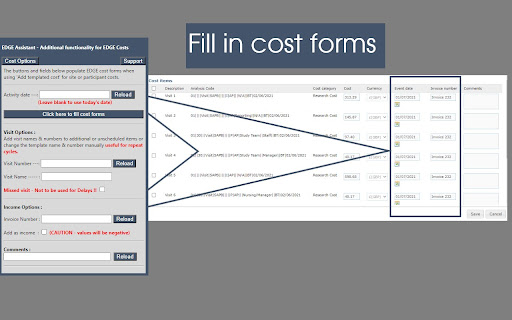
This extension works with the EDGE online research database to help fill in cost forms in the finance pages. By default ,although a "select all" option exists to add all costs from the template at once, the mandatory date field must be completed by hand by typing, using date pickers or copy-pasting each date - this can be time-costly when some templates may have a hundred line items. This extension populates the date fields with either today's date or a user-entered date, adds invoice numbers, can convert cost items to income items and deals with missed visits. As is normal, only line items where the checkbox is ticked on the form will be saved, so individual items can be included or excluded as normal.
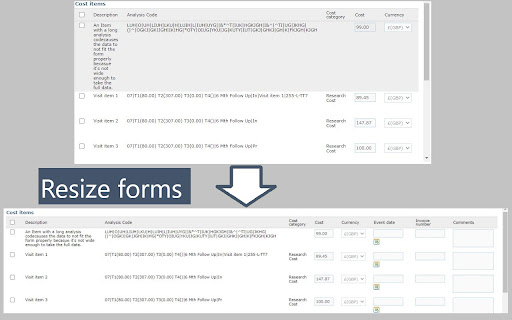
The extension also addresses an issue where the cost dialog boxes can be too small to show all fields if a long analysis code is entered. This is addressed by automatically resizing the form to show all fields when the form is filled.
This extension does not look for, access, store or process any data other than searching for date, cost, invoice, analysis code and comment fields, and filling them in. The user must still select the checkbox for each line item (or select all) and must still click save to store the data.
| 分类 | 📝工作流程与规划 |
| 插件标识 | jochfnpjmaeilfcchidpjklaeofjnaom |
| 平台 | Chrome |
| 评分 |
★★★★★
5
|
| 评分人数 | 2 |
| 插件主页 | https://chromewebstore.google.com/detail/edge-assistant/jochfnpjmaeilfcchidpjklaeofjnaom |
| 版本号 | 2.1 |
| 大小 | 50.42KiB |
| 官网下载次数 | 136 |
| 下载地址 | |
| 更新时间 | 2022-11-08 00:00:00 |
CRX扩展文件安装方法
第1步: 打开Chrome浏览器的扩展程序
第2步:
在地址栏输入: chrome://extensions/
第3步: 开启右上角的【开发者模式】
第4步: 重启Chrome浏览器 (重要操作)
第5步: 重新打开扩展程序管理界面
第6步: 将下载的crx文件直接拖入页面完成安装
注意:请确保使用最新版本的Chrome浏览器
同类插件推荐

Lime Go eSignatures by GetAccept
Electronic Signatures and Document Tracking for Li

SEO Doctor
SEO Doctor is a free tool for SEO Expert. It helps

Video Extration Tool
Do whatever it takes to show the video in a pageWi

Proton vs Electron - Html5 Game
Proton vs Electron is an HTML5 puzzle game where p
EDGE Assistant
An extension to fill in EDGE database cost input f

BASC ME Tool
Adds rank details and ribbons to Magic Eden.Provid

Dreamdata
Get instant access to Dreamdata insights as you br

Zeeromed Multi-monitor
Zeeromed client-side managementZEEROmed extension

CoffeeScript Compiler
CoffeeScript CompilerWrite and run coffee-script i

Laser Search
A list of ''specialist'' Search En

CC/BC SKU Widget
Instantly copy SKUs and check stock on the Competi

Sports Social Feed
This extension makes your web browsing much easier

Glints TalentRadar
Supercharge your sourcing efforts.For Glints recru