
Lil' Scribbler Chrome 插件, crx 扩展下载

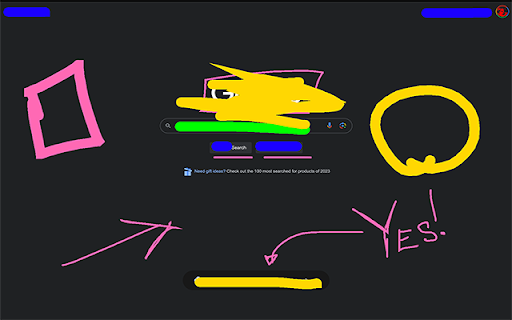
Allows you to draw on any webpage and wipe it all away with a stab of your Delete key.
Li’l Scribbler is a Chrome extension that lets you draw, write, and annotate directly on web pages. It’s designed to be a companion when presenting over a video conference. The UI focuses on keyboard control to switch between tools and options quickly and never get in the way of your communication.
Quick Start
* Activate Drawing Mode: Click the Li’l Scribbler icon in your Chrome toolbar to enable the drawing tools.
* Select a Tool: Use the left arrow key to cycle through tools: Pen, Rectangle, Arrow, Text, and Eraser.
* Choose a Color: Press the right arrow key to switch between colors.
* Adjust Size: Use the up arrow to increase and the down arrow to decrease the size of your selected tool.
* Draw or Type: Click and drag to draw; click to place text, then type.
* Finish Up: Press Enter to finalize text entries. Press the Delete key to remove annotations.
* Deactivate Tools: Click the Li’l Scribbler icon again to turn off drawing mode.
===Detailed Features and Shortcuts===
Tools:
* Pen Tool: Freehand draw; ideal for highlighting or sketching.
* Rectangle Tool: Draw rectangles; click and drag to define the area.
* Arrow Tool: Click, drag, and release to create arrows pointing to specific items.
* Text Tool: Click to position your cursor and start typing. Press Shift+Enter for a new line.
* Eraser Tool: Wipe away the stuff you don’t want on the screen.
Color and Size:
* Colors Available: Hot Pink, Lime Green, Deep Ocean Blue, Hazard Yellow, Pitch Black. Toggle through with the right arrow.
* Size Adjustment: Increase with the up arrow, decrease with the down arrow.
Text Manipulation:
* Multiline Text: Shift+Enter to add new lines.
* Adjustable Text Size: Cmd+Up Arrow to increase; Cmd+Down Arrow to decrease.
* Moving Text: Hold Cmd, click and drag your text box. Finalize with Enter.
* “Finalize” Text: Enter/Return
Keyboard Shortcuts:
* Switch Tools: Left Arrow.
* Change Colors: Right Arrow.
* Tool Size: Up Arrow to increase, Down Arrow to decrease.
* Clear Annotations: Delete.
* Undo/Redo: Ctrl/Cmd + Z for undo, Ctrl/Cmd + Shift + Z or Y for redo.
Troubleshooting:
* Toggle Drawing Mode: If the tools aren’t appearing, try turning the drawing mode off and on again.
* Check Page Support: Li’l Scribbler won’t work on ‘chrome://’ or ‘chrome-extension://’ URLs. You'll see an "OFF" badge on the extension's icon if this is the case.
| 分类 | 🛠️工具 |
| 插件标识 | jplpdefjkhbikdmdepjnbmleokafcnjf |
| 平台 | Chrome |
| 评分 |
☆☆☆☆☆
0
|
| 评分人数 | 1 |
| 插件主页 | https://chromewebstore.google.com/detail/lil-scribbler/jplpdefjkhbikdmdepjnbmleokafcnjf |
| 版本号 | 2.0 |
| 大小 | 13.86KiB |
| 官网下载次数 | 49 |
| 下载地址 | |
| 更新时间 | 2024-07-12 00:00:00 |
CRX扩展文件安装方法
第1步: 打开Chrome浏览器的扩展程序
第2步:
在地址栏输入: chrome://extensions/
第3步: 开启右上角的【开发者模式】
第4步: 重启Chrome浏览器 (重要操作)
第5步: 重新打开扩展程序管理界面
第6步: 将下载的crx文件直接拖入页面完成安装
注意:请确保使用最新版本的Chrome浏览器
同类插件推荐
destream
collaborative browsing: as streamer—indirectly con
Lil' Scribbler
Allows you to draw on any webpage and wipe it all

Clockdiary Time Tracker
ClockDiary Time Tracker ExtensionEffortlessly moni

ShortLink
Quickly shorten URLs and track click analytics dir

Sup
Sup AI Helper Posting ExtensionAn ultimate AI tool

技术求职信生成器
轻松生成针对任何工作申请的求职信,使用为科技职位定制的AI,帮助您获得更多面试机会。Input yo
Viaplay Skipper: skip recaps, intros & more
Automatically skip intros, recaps and go to next e

Cloudmark - Collaborative Bookmark Manager
Cloudmark is a collaborative bookmark manager that

Userlove
Empower users with Userlove. Integrate product tou

CrecenTech Utilities
CrecenTech UtilitiesIt's a simple chrome exten

News Storyline
News StorylineIntroducing Timeline Tracker: Unveil