
Auto URL Opener Chrome 插件, crx 扩展下载
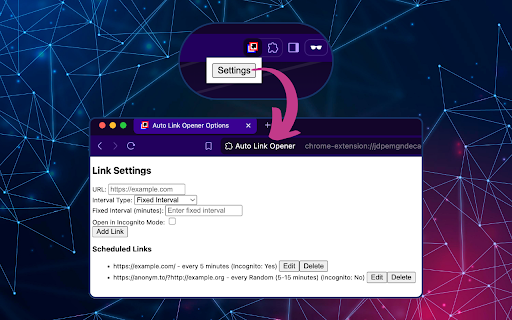

Automatically open specified links in new tabs at fixed or random time intervals, with optional incognito mode.
Easily schedule and launch your favorite URLs in the background at customizable intervals with our URL Scheduler extension! Perfect for users who need to periodically open websites, this extension acts as a powerful timer and launcher, letting you automatically open specific links in both standard and private (incognito) windows.
With its simple settings panel, you can set up a fixed or random interval timer for each URL, giving you complete control over how often each site is accessed. Ideal for researchers, task managers, and productivity enthusiasts, this scheduler helps streamline repetitive browsing tasks by running quietly in the background. For added privacy, simply enable the option to open links in an incognito window.
Features:
- Customizable interval scheduler for each URL.
- Option to open URLs in incognito (private window) mode.
- Background operation so that it works without interrupting your workflow.
- Choice between fixed or random intervals to keep your browsing dynamic.
Get organized and automate your browsing with this powerful URL scheduler and launcher – a simple way to save time and maintain privacy.
| 分类 | 🛠️工具 |
| 插件标识 | kaalejlpnngnlcfoogkgcolkikaekcki |
| 平台 | Chrome |
| 评分 |
★★★★☆
4.2
|
| 评分人数 | 73 |
| 插件主页 | https://chromewebstore.google.com/detail/auto-url-opener/kaalejlpnngnlcfoogkgcolkikaekcki |
| 版本号 | 1.0 |
| 大小 | 13.29KiB |
| 官网下载次数 | 27 |
| 下载地址 | |
| 更新时间 | 2024-11-20 00:00:00 |
CRX扩展文件安装方法
第1步: 打开Chrome浏览器的扩展程序
第2步:
在地址栏输入: chrome://extensions/
第3步: 开启右上角的【开发者模式】
第4步: 重启Chrome浏览器 (重要操作)
第5步: 重新打开扩展程序管理界面
第6步: 将下载的crx文件直接拖入页面完成安装
注意:请确保使用最新版本的Chrome浏览器
同类插件推荐
Auto URL Opener
Automatically open specified links in new tabs at

Automatic Tab Opener
Enables the user to set specific times to open a t
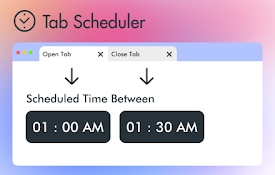
具有自动打开和关闭功能的选项卡调度程序
浏览器选项卡将在选定的时间自动打开和关闭。用户可以根据需要激活/停用列表如果你想在间隔几分钟后自动关

自动刷新页面
标签页自动刷新。自动刷新页面。使用固定或随机的指定时间间隔进行自动刷新和页面监控。最后,一个可以正常