
Simple Simulator Chrome 插件, crx 扩展下载
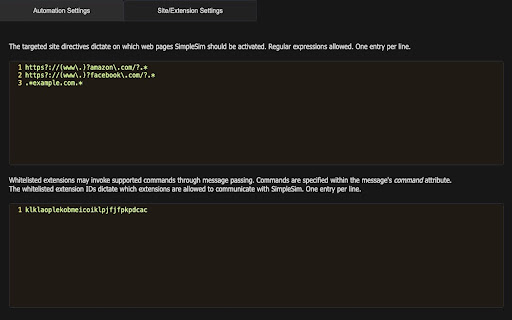
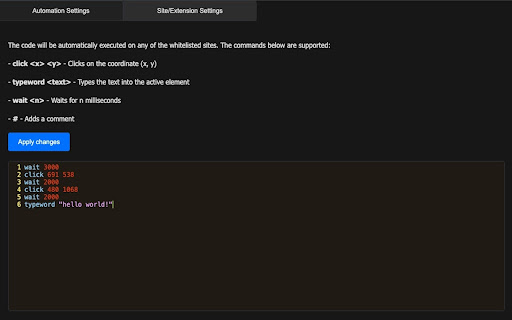
Simulates mouse and keyboard events on specified pages
Simple Simulator is designed for simulating mouse and keyboard events on web pages, facilitating the testing and automation of user interactions for beginners. It enables developers and QA professionals to automate clicks and key presses, thus streamlining the testing process. The extension offers basic scripting and website whitelisting, as well as messaging passing with whitelisted extensions. It supports precise control over event timing and sequence, making it suitable for testing dynamic and interactive web applications.
| 分类 | 💻开发者工具 |
| 插件标识 | kabfjdmjlillephmfdfaliigbgpgogci |
| 平台 | Chrome |
| 评分 |
☆☆☆☆☆
0
|
| 评分人数 | 6 |
| 插件主页 | https://chromewebstore.google.com/detail/simple-simulator/kabfjdmjlillephmfdfaliigbgpgogci |
| 版本号 | 1.1 |
| 大小 | 152KiB |
| 官网下载次数 | 51 |
| 下载地址 | |
| 更新时间 | 2024-04-16 00:00:00 |
CRX扩展文件安装方法
第1步: 打开Chrome浏览器的扩展程序
第2步:
在地址栏输入: chrome://extensions/
第3步: 开启右上角的【开发者模式】
第4步: 重启Chrome浏览器 (重要操作)
第5步: 重新打开扩展程序管理界面
第6步: 将下载的crx文件直接拖入页面完成安装
注意:请确保使用最新版本的Chrome浏览器
同类插件推荐

Pinboard Tools
Toolbar actions for Pinboard (http://pinboard.in)F

EmbedGPT - ChatGPT 내용을 공유하고 붙여넣기
클릭 한 번으로 공유하고 외부에 손쉽게 붙여넣기하세요.ChatGPT 내용을 클릭 한 번으로
Rock Paper Scissor Simulator
Wath the intense battle between rock, paper and sc

CCPA Opt Out Assistant
Notifies users when their data is sold and allows

Automatically Group Tabs
A chrome extension that automatically groups your

Alternative Copy
Copies a shortened shareable link of the current t

Gridify - Keyboard Link Selector
选择任何链接、图像、输入框或当前页面上的可选择区域,无需使用鼠标,只需点击几下键盘即可。This e
Simple Simulator
Simulates mouse and keyboard events on specified p

Run on PHP Playground
Open PHP Playground and run the sample code from p

TheClicker
An enhanced and advanced extension.TheClicker is a

Clicker (Browser Click Simulator)
Are you tired of repetitive clicking tasks that co

PageOne
Collects and organizes your browsing history into

Action Replay
Automate browser interactions by recording and rep