Simple Calculator Chrome 插件, crx 扩展下载
Simple extension for Simple calculations, free and smart with History functionality
Simple Calculator is a powerful and user-friendly calculator extension that brings advanced mathematical capabilities right to your browser. Whether you're a student, professional, or anyone who needs quick calculations, Simple Calc is your go-to tool for all your mathematical needs.
Features:
Basic arithmetic operations: Addition, subtraction, multiplication, and division
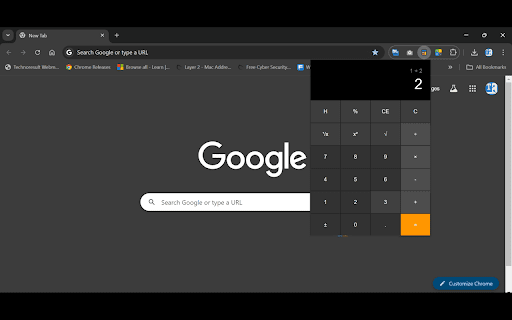
Advanced functions: Square root, square, reciprocal, and percentage calculations
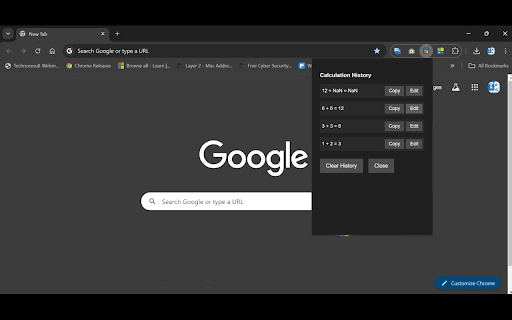
Editable calculation history: Review, copy, and edit your past calculations
Keyboard support: Use your keyboard for swift calculations
Clean, intuitive interface: Easy-to-use design for efficient calculations
How to Install:
Visit the Chrome Web Store and search for "Quick Calc" or use the direct link to our extension page.
Click the "Add to Chrome" button on the extension page.
A pop-up will appear asking for permissions. Click "Add extension" to proceed.
Once installed, you'll see the Quick Calc icon in your Chrome toolbar.
How to Use:
Click on the Quick Calc icon in your Chrome toolbar to open the calculator.
Perform calculations using either your mouse or keyboard:
Click the calculator buttons with your mouse
Or use your keyboard for input (numbers, operators, and Enter key for calculations)
For advanced functions:
'x²' calculates the square of a number
'√' calculates the square root
'¹/x' calculates the reciprocal
'%' converts the number to a percentage
View your calculation history:
Click the 'H' button to open the history panel
Use the 'Copy' button to copy any past calculation
Use the 'Edit' button to load a past calculation for modification
Edit mode:
When editing, use arrow keys to move the cursor
Use backspace to delete characters
Press Enter or '=' to perform the calculation
Clear your input with 'C' or 'CE' buttons
Tips:
Use keyboard shortcuts for faster calculations
The history feature is great for complex or repetitive calculations
Edit mode allows you to correct mistakes without starting over
Quick Calc is designed to be your reliable calculation companion, always just a click away in your browser. Whether you're balancing your budget, doing homework, or performing complex calculations at work, Quick Calc has got you covered!
Download Quick Calc now and experience the convenience of having an advanced calculator at your fingertips while browsing!
| 分类 | 🛠️工具 |
| 插件标识 | kbijcmgmcdmifphlljmoofgdadbddbkb |
| 平台 | Chrome |
| 评分 |
★★★★☆
4.9
|
| 评分人数 | 224 |
| 插件主页 | https://chromewebstore.google.com/detail/simple-calculator/kbijcmgmcdmifphlljmoofgdadbddbkb |
| 版本号 | 1.0.1 |
| 大小 | 249KiB |
| 官网下载次数 | 33 |
| 下载地址 | |
| 更新时间 | 2024-07-16 00:00:00 |
CRX扩展文件安装方法
第1步: 打开Chrome浏览器的扩展程序
第2步:
在地址栏输入: chrome://extensions/
第3步: 开启右上角的【开发者模式】
第4步: 重启Chrome浏览器 (重要操作)
第5步: 重新打开扩展程序管理界面
第6步: 将下载的crx文件直接拖入页面完成安装
注意:请确保使用最新版本的Chrome浏览器