
DailyQ - Coding Practice Chrome 插件, crx 扩展下载
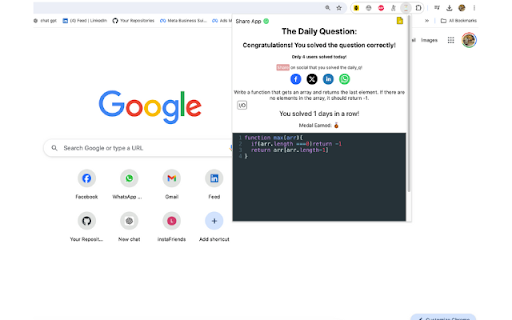
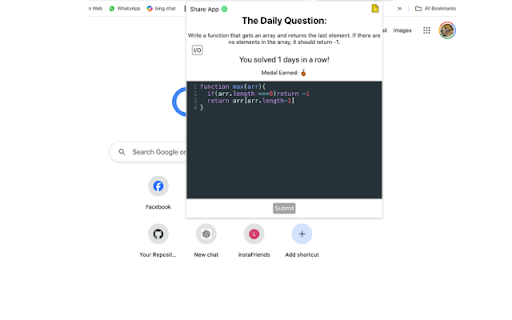
A Chrome extension for everyday coding practice.
Daily Q: Your Daily Coding Challenge
Daily Q is a Chrome extension designed to help you practice coding consistently. Every day, you receive a new JavaScript coding question—the daily question—that is shared among all users. This encourages a community of learning and problem-solving.
Features:
Daily Coding Question: Get a fresh coding challenge every day in JavaScript.
Consistency Tracker: Keep track of how many days in a row you’ve solved the daily question.
Earn Medals: Achieve medals for solving multiple consecutive daily questions (e.g., 3-day streak, 5-day streak).
Share Your Success: Share your solutions and achievements on social media to inspire others and celebrate your progress.
Why Use Daily Q?
Consistency is key to mastering coding and problem-solving skills. Daily Q helps you build a daily habit of coding practice, ensuring that you make continuous progress. By focusing on one question each day, you can steadily improve your coding abilities and stay motivated.
Join our community of learners and start your daily coding journey with Daily Q!
| 分类 | 📚教育 |
| 插件标识 | kdekchjfadjpldnpojmjggghhhbnoifb |
| 平台 | Chrome |
| 评分 |
★★★★☆
4
|
| 评分人数 | 12 |
| 插件主页 | https://chromewebstore.google.com/detail/dailyq-coding-practice/kdekchjfadjpldnpojmjggghhhbnoifb |
| 版本号 | 1.0 |
| 大小 | 675KiB |
| 官网下载次数 | 31 |
| 下载地址 | |
| 更新时间 | 2024-06-25 00:00:00 |
CRX扩展文件安装方法
第1步: 打开Chrome浏览器的扩展程序
第2步:
在地址栏输入: chrome://extensions/
第3步: 开启右上角的【开发者模式】
第4步: 重启Chrome浏览器 (重要操作)
第5步: 重新打开扩展程序管理界面
第6步: 将下载的crx文件直接拖入页面完成安装
注意:请确保使用最新版本的Chrome浏览器
同类插件推荐
DailyQ - Coding Practice
A Chrome extension for everyday coding practice.Da
Custom Highlight
A chrome extension for customizing highlight color

Chrome Dice
A simple dice rolling extension for Google ChromeC

QR Code Reader
A chrome extension for reading QR code from webpag