
TAGLAB - Analytics & Datalayer Console Viewer Chrome 插件, crx 扩展下载
Inspect & QA analytics tags, marketing tags, conversion pixels, and data layer variables for data auditing and tag monitoring.
Validate your website's analytics and audit your marketing tags with TAGLAB's powerful Chrome extension.
TAGLAB empowers digital marketers and developers to effortlessly inspect and QA analytics tags, marketing tags, conversion pixels, and data layer variables for comprehensive data auditing and tag monitoring. Seamlessly detect firing tags and data layer JS objects updates, with precision and efficiency.
Key Features:
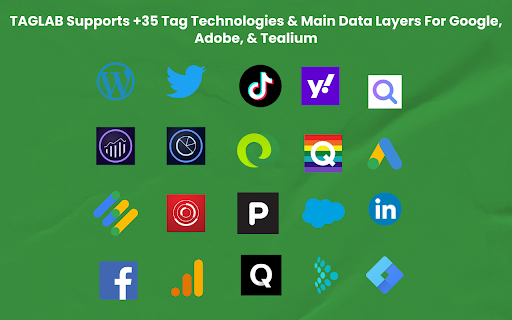
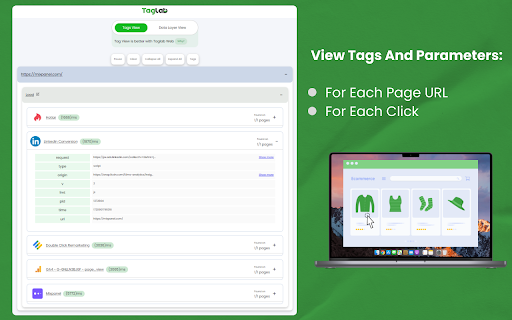
- View firing marketing tags of more than 35 tag types
- Verify tag parameters and marketing taxonomies
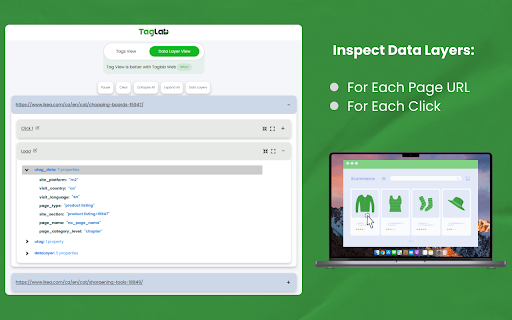
- View data layer variables
- Preserve page navigation history
- Distinct Events view for each click
How to Use TAGLAB Extension:
1) After installation, simply right-click on your browser and select "Inspect".
2) Navigate to the TAGLAB tab within the developer console.
3) Start browsing your website to capture firing tags and data layer values.
This chrome extension seamlessly supports a wide array of main vendors and custom technologies, which can be defined manually by users for comprehensive tag monitoring.
Experience enhanced efficiency and assurance in data integrity with TAGLAB – your ultimate solution for analytics and marketing tag auditing on Google Chrome.
Supported Tags:
- Google Analytics 4
- Universal Analytics
- Adobe Analytics
- Facebook Events
- Bing Ads
- Double Click Tags
- Linkedin Conversions
- Inspectlet
- Hotjar Tag
- Google Ads Conversions
- Tiktok Pixel
- Google Tag Manager
- Adobe Launch
- MS Clarity
- Piwik
- Tealium
. Yahoo Analytics
- Youtube Stats
- Wordpress Site Stats
- Twitter Widget
- Quantcast
- Qubit Open Tag
- Mixpanel
- Salesforce
- Adobe Audience Manager
Supported Data Layer Objects:
- Data Layer (GTM)
- Digital Data (Adobe Launch)
- uTag (Tealium)
For additional supported technologies, feedback, or inquiries, please don't hesitate to contact us.
| 分类 | 💻开发者工具 |
| 插件标识 | kfenlfbjdpdgblnoabpdehlabodakbmp |
| 平台 | Chrome |
| 评分 |
★★★★☆
4.9
|
| 评分人数 | 64 |
| 插件主页 | https://chromewebstore.google.com/detail/taglab-analytics-datalaye/kfenlfbjdpdgblnoabpdehlabodakbmp |
| 版本号 | 1.3.4 |
| 大小 | 1000KiB |
| 官网下载次数 | 1000 |
| 下载地址 | |
| 更新时间 | 2024-07-14 00:00:00 |
CRX扩展文件安装方法
第1步: 打开Chrome浏览器的扩展程序
第2步:
在地址栏输入: chrome://extensions/
第3步: 开启右上角的【开发者模式】
第4步: 重启Chrome浏览器 (重要操作)
第5步: 重新打开扩展程序管理界面
第6步: 将下载的crx文件直接拖入页面完成安装
注意:请确保使用最新版本的Chrome浏览器
同类插件推荐

TAGLAB - Analytics & Datalayer Console Viewer
Inspect & QA analytics tags, marketing tags, c

dataLayer Digger Plus
Help analysing the dataLayer for Google Tag Manage

DataLayer Checker Plus
The simplest way to debug and verify dataLayer imp

Simple Data Layer Viewer
Simple extension for displaying the data layer of

GTM Watson
A GTM helper which let's you see events in rea

dataLayer Explorer
dataLayer Explorer is designed to simplify the ana

ObservePoint Debugger
Troubleshoot analytics tags, variables, events, co

Omnibug
Omnibug is a browser extension to decode and displ

Datalayer Checker
The easiest way to debug and check the dataLayer i

TagHound - Analytics/GTM/Pixel Debugger
Debug Google Analytics, Google Tag Manager dataLay

Tag Assistant Companion
The Tag Assistant Companion extension works with T

Adswerve - dataLayer Inspector+
DataLayer Tools for Digital AnalystsThe Adswerve d

WASP.inspector: Analytics Solution Profiler
Digital analytics quality made easy▶ WASP.inspecto