
Save Image As JPG, PNG, WebP Chrome 插件, crx 扩展下载
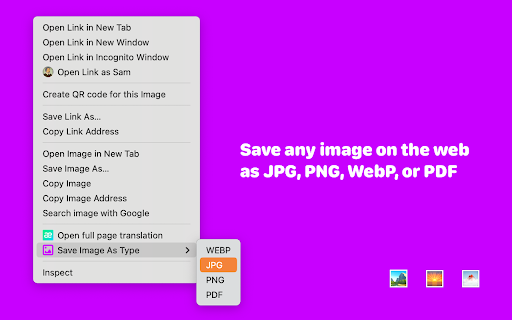
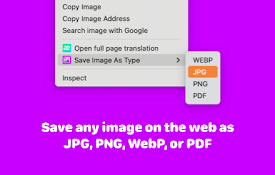
Right click on an image and save it as JPG, PNG, or WebP.
Save Image As JPG, PNG, PDF, WebP
Effortlessly save images in your preferred format with just a right-click!
?️ Key Features:
• Convert and save images as JPG, PNG, PDF, or WebP
• Simple right-click context menu integration
• Supports a wide range of websites
• Fast and efficient image processing
? How It Works:
1. Right-click on any image you want to save
2. Select "Save Image As Type" from the context menu
3. Choose your desired format (JPG, PNG, PDF, or WebP)
4. The image will be saved in your chosen format
? Why Choose Our Extension:
• Versatile: Perfect for designers, researchers, and casual users
• Time-saving: No need for separate image conversion tools
• User-friendly: Intuitive interface requires no technical knowledge
• Free: Enjoy all features at no cost
Whether you're collecting inspiration, saving research materials, or just want to keep your favorite images in a specific format, our extension streamlines the process. Say goodbye to the hassle of downloading and converting images manually!
? Pro Tip: Use PDF format to easily combine multiple images into a single document, great for creating mood boards or compiling visual research.
? Privacy Focused: We respect your privacy. This extension only accesses image data when you choose to save an image and doesn't collect any personal information.
Enhance your browsing experience today - download "Save Image As JPG, PNG, PDF, WebP" and take control of how you save images from the web!
Note: Please use this extension responsibly and respect copyright laws and content creators' rights.
| 分类 | 🛠️工具 |
| 插件标识 | kimfknhghkailpllnopclaelfjechldp |
| 平台 | Chrome |
| 评分 |
☆☆☆☆☆
0
|
| 评分人数 | 137 |
| 插件主页 | https://chromewebstore.google.com/detail/save-image-as-jpg-png-web/kimfknhghkailpllnopclaelfjechldp |
| 版本号 | 1.0.3 |
| 大小 | 17.78KiB |
| 官网下载次数 | 3000 |
| 下载地址 | |
| 更新时间 | 2025-02-05 00:00:00 |
CRX扩展文件安装方法
第1步: 打开Chrome浏览器的扩展程序
第2步:
在地址栏输入: chrome://extensions/
第3步: 开启右上角的【开发者模式】
第4步: 重启Chrome浏览器 (重要操作)
第5步: 重新打开扩展程序管理界面
第6步: 将下载的crx文件直接拖入页面完成安装
注意:请确保使用最新版本的Chrome浏览器
同类插件推荐
图片另存为PNG, JPG, WebP...
它可以轻松帮助您将网页图片另存为 PNG、JPG 或 WebP..它可以轻松帮助您将网页图片另存为

Save WEBP as JPG/PNG
Gives the option to save WEBP images to JPG/PNGA n
保存图片为
将图像保存为PDF、JPG、PNG或WebP。使用图像上下文菜单。将图像保存为PDF、JPG、PNG

Save Image As PNG/JPG/WebP
Convert images to PNG, JPG, or WebP format with ea
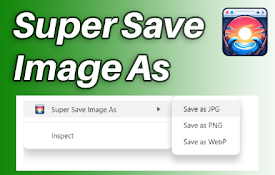
Super Save Image As
Save images as png, jpg, or webp by right-clicking

WebP 到 JPG 转换器
使用这个 Chrome 扩展程序轻松将 WebP 转换为 JPG!只需点击几下即可快速转换为 JPG

PromptSync
Ask ChatGPT, Bard AI, and Bing Chat with one singl

Save Image As PNG
Adds a "Save Image as PNG" option to the
Save Image As JPG, PNG, WebP
Right click on an image and save it as JPG, PNG, o

Save As Image
Save and convert images to JPG, PNG, WebP and othe

Salesforce Shortcuts
Provides quick shortcuts to most used URLs in Sale

SaveAs - 图片另存为PNG/JPG/WebP
右键图片另存为PNG/JPG/WebP.Save as PNG/JPG/WebP,如何获取不同格式的

Save Image As Png
Save Image As PngSave image as png Adds the "