
D365FO-DevTools Chrome 插件, crx 扩展下载

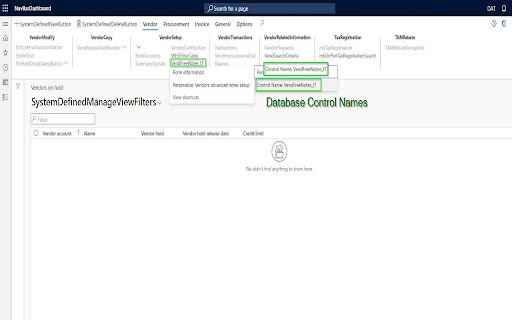
A chrome D365FO extension for users that changes the color of navigation bar and shows the Database names of form fields and more
Overview
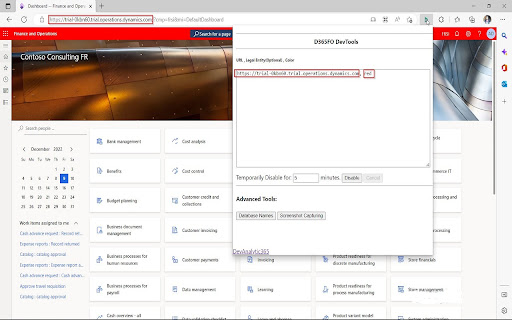
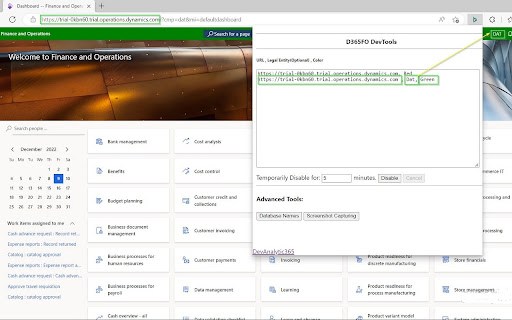
A D365FO Extension that is compatible with Google Chrome and Microsoft Edge, allowing users to change the color of the navigation bar to show the database names of forms, fields, and more.
Now you don’t have to be confused ever again!
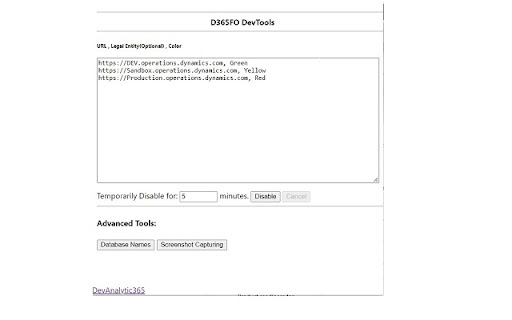
Personalize D365FO navigation bar colors:
• According to URL
• By legal entity names
• Database form names in Dynamics365 Finance and Operations
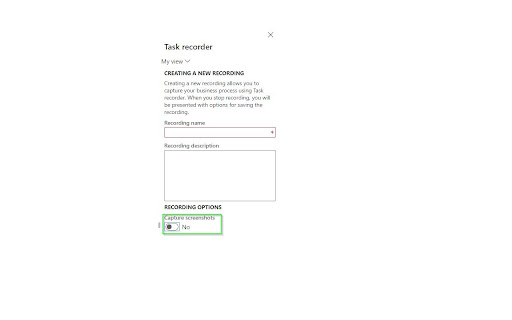
You can also add screenshot capturing to the task recorder. It can be installed in Microsoft Edge and is fully compatible with the browser.
Applications
D365FO Extension allows the user to change the color of the D365FO (Dynamics 365 Finance and Operations) navigation bar according to the environment. The latest version of the tool can instantly show database form names.
For more information, please visit this link:
https://devanalytic365.com/blog/f/how-change-d365-fo-navigation-bar-color-in-chrome
Features
• Instantly show database form names
• Allows users to distinguish environments by legal entity names
• Adds screenshot capture feature to task recorder (Screenshot capturing chrome extension)
• Adds D365FO task recorder screenshot (Dynamics 355 FO task recorder with screenshot)
Update V 7.0
• Added a checkbox to show an environment banner at the bottom right of the screen
• Revamped the Chrome extension with a brand-new design, improving usability and aesthetics.
Update V 6.0.1
• Updated to properly handle order of text entries
Update V 6.0.0
• Updated to Manifest V3
Update V 5.1.2
• Columns Header Database Name added
Update V 5.1.1
• Enhanced Database form name function
The tool now displays more fields in the Database form names function, including some missing headers in previous versions.
Update Version 5.1.0
• Visuals improved
• Stability improved
• Functionality improved
Disclaimer
The product is not provided with any warranty by the developer and comes “as it is.”
(Previously known as D365FO-Navbarcolor)
Note
We do not collect any usage, analytics, or personal data in any capacity for any purpose.
| 分类 | 💻开发者工具 |
| 插件标识 | klpaihnmefppdfjmodipinghakkemlkg |
| 平台 | Chrome |
| 评分 |
☆☆☆☆☆
0
|
| 评分人数 | 3 |
| 插件主页 | https://chromewebstore.google.com/detail/d365fo-devtools/klpaihnmefppdfjmodipinghakkemlkg |
| 版本号 | 7.0.0 |
| 大小 | 339KiB |
| 官网下载次数 | 5000 |
| 下载地址 | |
| 更新时间 | 2025-02-16 00:00:00 |
CRX扩展文件安装方法
第1步: 打开Chrome浏览器的扩展程序
第2步:
在地址栏输入: chrome://extensions/
第3步: 开启右上角的【开发者模式】
第4步: 重启Chrome浏览器 (重要操作)
第5步: 重新打开扩展程序管理界面
第6步: 将下载的crx文件直接拖入页面完成安装
注意:请确保使用最新版本的Chrome浏览器
同类插件推荐

Dynamics 365 Finance & Operations Dev Tools
Dynamics 365 Finance & Operations Developer To

Embedded input for BE-Search for D365 FO
Access BE-terna Search from the navigation bar in

dynaBar D365FO
Change the current navigation barAdd new actions t

Dynamics 365 F&O warehouse scanner
Open the warehouse scanner of the environment you

D365 F&O Task Recorder Screenshots and Video
D365 Finance and Operations Task Recorder Screensh

Environment Tagger
Never delete those production data again!This exte
D365FO-DevTools
A chrome D365FO extension for users that changes t

D365-UI-Test-Designer
A browser extension for designing and capturing D3

Dynamics 365 F&O Task Recorder Screenshot
Screenshot capture used for Dynamics 365 for Finan

Table Browser Caller for D365FO
Arineo Table browser caller for Microsoft Dynamics

Dynamics 365 F&O table browser
View the content of a table in the Dynamics 365 en

Dynamics 365 Record Counter
Dynamics 365 Web Api based counter for both OData

c! Dynamics 365 Helper
Small and usefull js-functions to manipulate Dynam