
Netflix with Elapsed Time Chrome 插件, crx 扩展下载
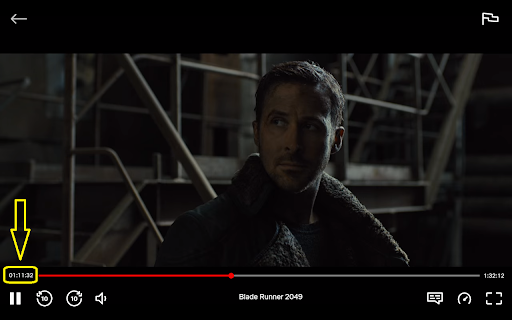
Netflix with Elapsed Time displays the elapsed time from the beginning.
Netflix with Elapsed Time displays the elapsed time from the beginning. If it does not work from the start, simply reload the page. It will only work when actually watching a video. Please, rate and leave a review if you like this extension. I would also appreciate any feedback on how to give you a better experience.
| 分类 | ⚙️功能性 |
| 插件标识 | knglmjodeneocikihhehegeifgabkjfa |
| 平台 | Chrome |
| 评分 |
★★★★☆
4.2
|
| 评分人数 | 647 |
| 插件主页 | https://chromewebstore.google.com/detail/netflix-with-elapsed-time/knglmjodeneocikihhehegeifgabkjfa |
| 版本号 | 2.2.0 |
| 大小 | 25.48KiB |
| 官网下载次数 | 2000 |
| 下载地址 | |
| 更新时间 | 2024-01-12 00:00:00 |
CRX扩展文件安装方法
第1步: 打开Chrome浏览器的扩展程序
第2步:
在地址栏输入: chrome://extensions/
第3步: 开启右上角的【开发者模式】
第4步: 重启Chrome浏览器 (重要操作)
第5步: 重新打开扩展程序管理界面
第6步: 将下载的crx文件直接拖入页面完成安装
注意:请确保使用最新版本的Chrome浏览器
同类插件推荐

Netflix Timestamp Link
Send Netflix links at a specific time in the video
Netflix with Elapsed Time
Netflix with Elapsed Time displays the elapsed tim

Netflix International
Displays all available Netflix audio and subtitle

치즈 나이프 - 치지직 CHZZK 도구 모음
치지직에 유용한 기능과 도구를 추가합니다.네이버 스트리밍 플랫폼 치지직(CHZZK)에 다양
Netflix Rewind 1 sec
Seek through video with an x amount of seconds (ad

New Netflix 1080p
Forces 1080p and 5.1 playback for Netflix as well

Super Netflix
Change video quality, Control video speed, Upload

Netflix - higher quality
Forces 1080p playback for Netflix.The maximum reso

Netflix 1080p
Forces 1080p and 5.1 playback for Netflix.A way to

Netflix™ Extended
Extension for Netflix™ to skip intros, recaps, sta

Better Netflix
Adds various features to Netflix like support for
![HyperChat [Improved YouTube Chat]](https://www.chajianmi.com/images/S3_Fc4pZJDp503jgQVTw7VzKPWn0jz7BnMHrrZriA4WCzN_NiTQLeo9sZa_oPc2crY_HNApbFjbzPYyFDu_oTjfG=s60)
HyperChat [Improved YouTube Chat]
Improved YouTube chat with CPU/RAM optimizations,

Video Screenshot
Capture full frame screenshots of video from YouTu