
Weeklyer - Productivity Tab Chrome 插件, crx 扩展下载
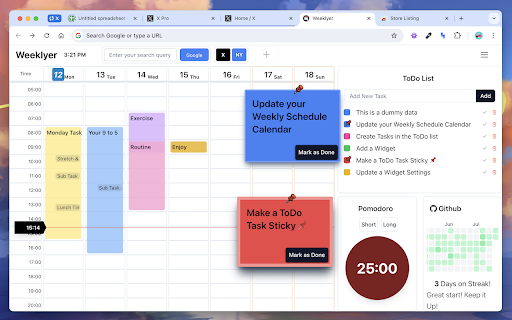

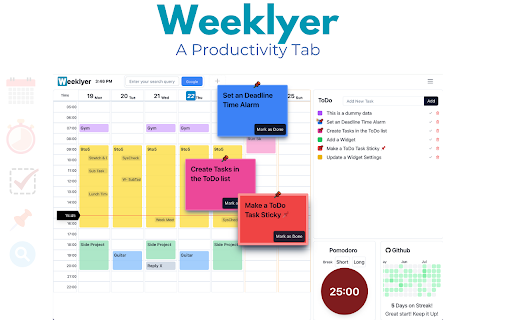
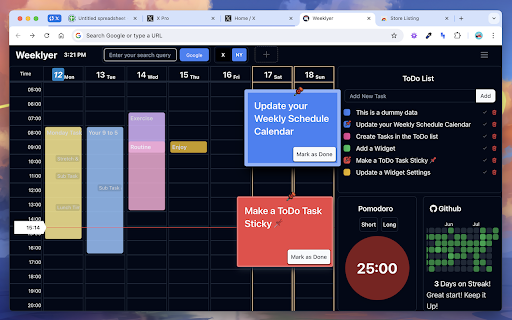
Weeklyer - A simple productivity tool
*In Beta Testing*
*I did it thinking about my needs, but that is not the law, your opinion and feedback are more than welcome*
? Weeklyer
------------------------------------------------------------
Looking for something to help you stay organized and boost your productivity? Meet Weeklyer.
Forget about the "zen" of a pretty pictures, that's for dreaming about where you'll go once the work is done.
Weeklyer is a tool I created for myself, so it gets straight to the point. It's perfect for people like me who can get a little distracted, focus too much on one task and forget about others, or simply lose track of tasks or notes written down in who knows which app. That’s why I find it helpful: I can see exactly my main daily tasks every time, and when I open a new tab, I can quickly write things down and have them right in front of me.
⭐️ Features:
------------------------------------------------------------
? It's Free !!
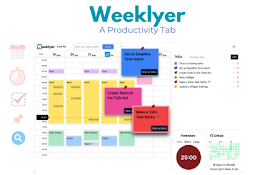
?️ Weekly Routine Calendar:: Add your routine by days and hours.
- Google Calendar:: Conect your GCalendar with Weeklyer
✅ To-Do List:: For specific tasks you want to add.
- ?Make them sticky if you need them more visible!
⏰ Pomodoro:: Prefer to focus for 25 minutes at a time? Just hit the button.
? Quick Links:: Add links to your most visited sites.
?️♀️ API Monitor:: (Maybe a bit personal) If you’re a developer who needs to monitor several systems, you can set up an endpoint and keep track of them here.
? GitHub Wall:: For developers who like to keep an eye on their streak.
?️ Customization: Adjust the app’s appearance (some) and add extra widgets as needed.
? Multilingual:: The main language is English, but I’ll be gradually adding more languages based on user feedback.
?️ Privacy & Security
------------------------------------------------------------
Weeklyes is an extension that work in the "new tab" page.
No registration/login/signup/... is required. And the extension do not collect or share any data.
Doesn't do any kind of user tracking.
All user settings are stored currently in localstorage, so everything will be safe as long as you don't share your computer.
In the future, probably will add more useful features, including the option to sign up and save your data in the cloud, so you can sync your settings across multiple computers.
*Remember, I develop and maintain this extension in my free time. I’ll keep it free as long as it doesn’t demand too much time or money, and will respond to feedback and bug reports as quickly as possible in my free time.
| 分类 | 📝工作流程与规划 |
| 插件标识 | kpkelbpkhlknfbgobfafppmkgiiemmgd |
| 平台 | Chrome |
| 评分 |
★★★★☆
4.8
|
| 评分人数 | 340 |
| 插件主页 | https://chromewebstore.google.com/detail/weeklyer-productivity-tab/kpkelbpkhlknfbgobfafppmkgiiemmgd |
| 版本号 | 1.1.0 |
| 大小 | 468KiB |
| 官网下载次数 | 31 |
| 下载地址 | |
| 更新时间 | 2024-12-18 00:00:00 |
CRX扩展文件安装方法
第1步: 打开Chrome浏览器的扩展程序
第2步:
在地址栏输入: chrome://extensions/
第3步: 开启右上角的【开发者模式】
第4步: 重启Chrome浏览器 (重要操作)
第5步: 重新打开扩展程序管理界面
第6步: 将下载的crx文件直接拖入页面完成安装
注意:请确保使用最新版本的Chrome浏览器
同类插件推荐

Bolt
The purpose of this Google Chrome extension is to

Bluesky Analytics
Insights for your Bluesky activities and engagemen
Wrote: Easy Notes Tab
Wrote offers a free, minimalist note-taking tool i
Beesy - AI Enhanced Task and Audio Note Extension
Manage your tasks and turn meetings into notes and
Weeklyer - Productivity Tab
Weeklyer - A simple productivity tool*In Beta Test

X/Twitter Image BG Gradient Frame
Add beautiful gradients backgrounds to images dire

focusLab:效率工具
将您的生产力提升到新的高度。专注实验室 (focusLab):将您的生产力提升到新的高度 优化您的
New Tab Notes
Turn your New Tab into a clean, distraction-free n
Time Blocking with TaskBlock
The easiest way to boost productivity by time bloc

Tab Notes
Tab Notes will helps you to make notes on the brow

Casca: New Tab with ChatGPT and Widgets
Customise your new tab page and boost your product

Dashy New Tab Dashboard and Side Panel
New Tab Dashboard and Side Panel that integrates w

SuperX (Twitter Analytics)
Super insights for your X (Twitter) activities and