
_blank Chrome 插件, crx 扩展下载
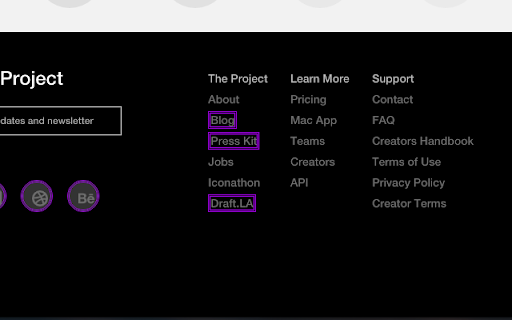
Put a double purple border around links that will open in a new tab (i.e. have target="_blank")
This extension will put a double purple border around all links that will open in a new tab (i.e. links with target="_blank").
There are two main purposes for this extension:
1. If you build or manage websites, this is a great way to check that _blank is or is not being used on various links.
2. Sometimes _blank links are hiding amongst normal links. With the _blank extension you'll have a heads up before clicking a link that will pop open a new tab/window.
Feel free to fork/contribute: https://github.com/bzle/_blank
------------------------
This is designed to be a compliment to igorware.com's NoFollow extension, which puts a red dotted outline around nofollow links. (https://chrome.google.com/webstore/detail/nofollow/dfogidghaigoomjdeacndafapdijmiid)
| 分类 | 💻开发者工具 |
| 插件标识 | lbbeapbpffjiknofgfdjbkllbmgnnaah |
| 平台 | Chrome |
| 评分 |
☆☆☆☆☆
|
| 评分人数 | |
| 插件主页 | https://chromewebstore.google.com/detail/blank/lbbeapbpffjiknofgfdjbkllbmgnnaah |
| 版本号 | 8.3 |
| 大小 | 55.06KiB |
| 官网下载次数 | 211 |
| 下载地址 | |
| 更新时间 | 2016-07-16 00:00:00 |
CRX扩展文件安装方法
第1步: 打开Chrome浏览器的扩展程序
第2步:
在地址栏输入: chrome://extensions/
第3步: 开启右上角的【开发者模式】
第4步: 重启Chrome浏览器 (重要操作)
第5步: 重新打开扩展程序管理界面
第6步: 将下载的crx文件直接拖入页面完成安装
注意:请确保使用最新版本的Chrome浏览器