
LionEXT by D.M. Chrome 插件, crx 扩展下载
Adds additional features in google pages to make easier the daily work of the SEO Consultant.
The extension gives the following features for the user:
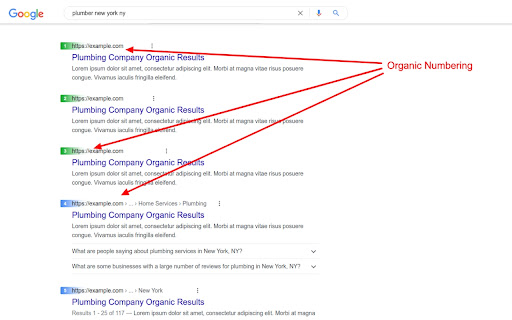
• Organic Numbering – Numbering the organic results in search engine results page (SERP);
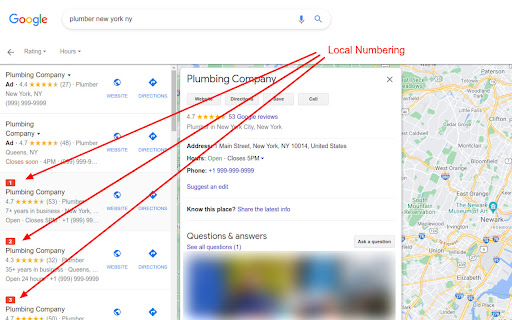
• Google Finder Numbering – Numbering the organic results in the Google Local Finder (local results);
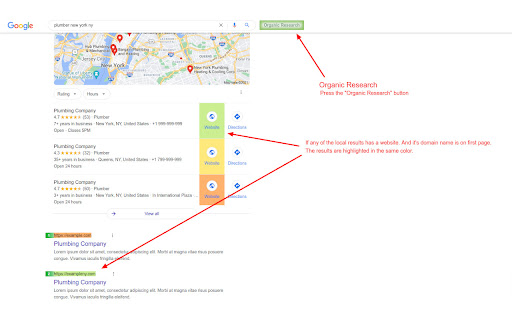
• Organic Research – Check if any website of Google My Business (GMB) in local pack is on first page of the SERP too;
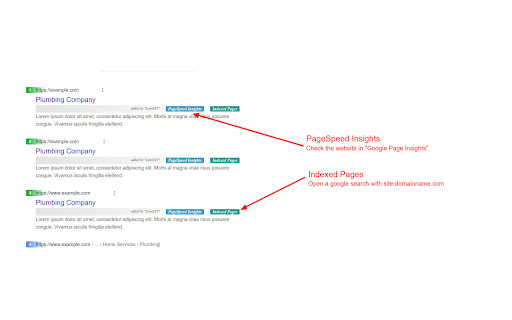
• Shortcut to “PageSpeed Insights” – adds direct link to check the website in “PageSpeed Insights”;
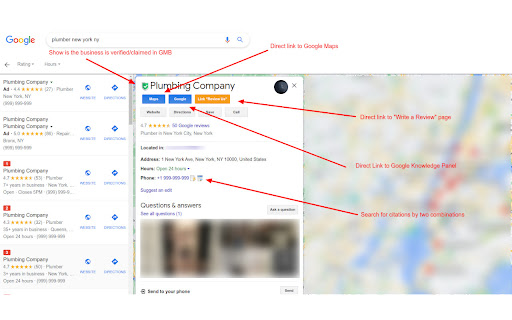
• Direct link to Google My Business page – adds direct link to Google My Business listing page in Google Local Finder;
• Check Citations – Adds two options to check the citations in Google for the selected GMB profile
– by phone
– by Company Name & Phone;
• Website indexed pages – adds direct link which will help to see how many indexed pages the selected website has in Google;
• Website metadata - Shows a report with the metadata of the website page - title, meta description, heading tags;
• GMB Listing is Owner verified or not – Adds marker which shows you if the selected Google My Business listing in Google Local Finder is owner verified or not;
• Direct “Write a review” link** – Adds a direct link “Review Us”. You can copy it and add it in your website.
| 分类 | 🛠️工具 |
| 插件标识 | lbcploibeleaoappjpnobgfofhgihmal |
| 平台 | Chrome |
| 评分 |
★★★★☆
4.2
|
| 评分人数 | 48 |
| 插件主页 | https://chromewebstore.google.com/detail/lionext-by-dm/lbcploibeleaoappjpnobgfofhgihmal |
| 版本号 | 2.0.0 |
| 大小 | 82.48KiB |
| 官网下载次数 | 459 |
| 下载地址 | |
| 更新时间 | 2022-03-28 00:00:00 |
CRX扩展文件安装方法
第1步: 打开Chrome浏览器的扩展程序
第2步:
在地址栏输入: chrome://extensions/
第3步: 开启右上角的【开发者模式】
第4步: 重启Chrome浏览器 (重要操作)
第5步: 重新打开扩展程序管理界面
第6步: 将下载的crx文件直接拖入页面完成安装
注意:请确保使用最新版本的Chrome浏览器
同类插件推荐

LionEXT by D.M.
Adds additional features in google pages to make e

GMB Page - CID & PlaceID Finder
This plugin will help you to find the CID & Pl

GMB Audit - GMBEverywhere.net
GMB Audits, Generate Google review link, get googl

PageOptimizer Pro
The PageOptimizer Pro extension syncs with the on

SerpWorx
SerpWorx SEO extension. Free trial version, no cc

Link Research SEO Toolbar
Enjoy looking at the most advanced SEO metrics whi

MREID Extractor For GMBs
This extension will attempt to get the MREID of a

Phantom - GMB Audit Tool
A GMB audit tool that provides enhanced insight in

Company Information in Google
Get Company Information when using Google Search &

GMB Audit - Local SEO Tool
Generate Google review link, find GMB categories,

GMBspy
Allows viewing of Google Business Profile, Google
gs location changer
change location for google searchlet's you cho

PlePer Local SEO Tools
Useful shortcuts and quick analyzes for Local SEO`