
DilterBilter - ChatGPT Conversation Search Chrome 插件, crx 扩展下载
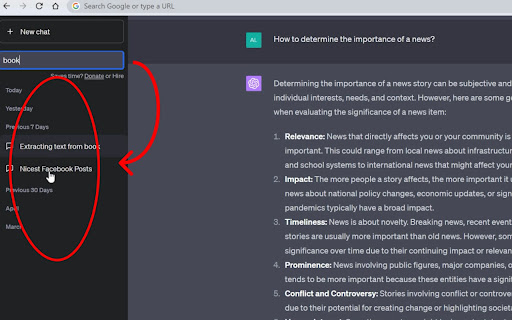

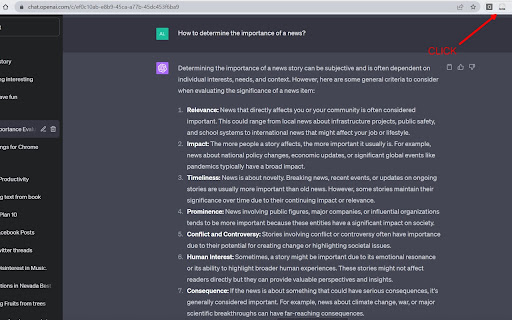
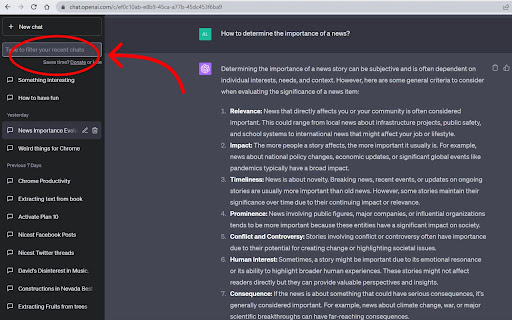
DilterBilter, a History Conversation Filter, quickly searches and filters your chatGPT chats history
DilterBilter, a History Conversation Filter, swiftly filters your ChatGPT conversations
Designed to enhance your browsing and chat experience, DilterBilter simplifies your interaction with the platform by providing a dynamic search field for real-time filtering of chats.
Current limitation: it filters the names of the conversations only. Please support the development of these new features at buymeacoffee.com/yatsiv:
* Filter all the conversations available in your ChatGPT
* Search messages by keywords
You can also fork the plugin on github and suggest improvements
? To utilize DilterBilter, the ChatGPT History Filter, simply click on the extension icon located on your browser's toolbar. This action will activate the extension and introduce a search field to your active chat window.
? Begin typing in this field to filter your chat history based on your input. Chat threads that do not match your search criteria will be hidden, leaving only those relevant to your search visible.
?♀️ You can deactivate and remove the search field at any time by clicking on the extension icon again.
Please be aware that there may be some bugs. If you encounter any, we would greatly appreciate your reporting them.
Thank you for your support! ❤️
History of Changes
1.07 - Fixed regular annoying welcome page openings
1.06 - Fixed minor issues
1.05 - Fixed minor issues
1.04 - Adjusted filter field location due to the recent interface change by ChatGPT
1.03 - Now hides headers like "7 days ago, 1 month ago" if there are no matching chats
1.02 - Fixed issue with input field disappearing once you clicked on the chat
1.01 - Issues with the name
Suggest imrpovements:
For it on Github: https://github.com/ukraine/dilterbilter
| 分类 | 📝工作流程与规划 |
| 插件标识 | lbdcfmlpnienahldeimdphjajfaddaek |
| 平台 | Chrome |
| 评分 |
★★★★☆
4.6
|
| 评分人数 | 460 |
| 插件主页 | https://chromewebstore.google.com/detail/dilterbilter-chatgpt-conv/lbdcfmlpnienahldeimdphjajfaddaek |
| 版本号 | 1.09 |
| 大小 | 56.29KiB |
| 官网下载次数 | 335 |
| 下载地址 | |
| 更新时间 | 2024-06-13 00:00:00 |
CRX扩展文件安装方法
第1步: 打开Chrome浏览器的扩展程序
第2步:
在地址栏输入: chrome://extensions/
第3步: 开启右上角的【开发者模式】
第4步: 重启Chrome浏览器 (重要操作)
第5步: 重新打开扩展程序管理界面
第6步: 将下载的crx文件直接拖入页面完成安装
注意:请确保使用最新版本的Chrome浏览器
同类插件推荐
DilterBilter - ChatGPT Conversation Search
DilterBilter, a History Conversation Filter, quick

PolyBox - 一键开启ChatGPT对话、管理指令库,快捷启动多个搜索引擎,搜索标签页、书签、历史、下载,短网址导航
一站式全能搜索提升生产力!从一个搜索框中,轻松开启ChatGPT对话,搜索标签页、书签、历史记录、下

ChatGPT Batch Delete History Manager
ChatGPT Batch Delete History ManagerFeatures: - Ba

Searchable ChatGPT: 搜索 GPT 对话历史
即刻搜索 ChatGPT 对话历史。完全本地化和私密。按侧边栏按钮或快捷键- ? 精确/模糊搜索 C