
Smart Auto-Refresh & Notify Chrome 插件, crx 扩展下载
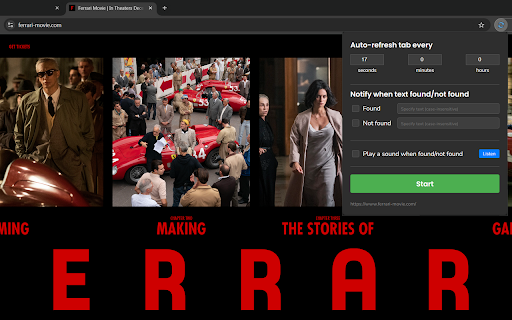
Automatically refreshes the tab and notifies you based on specified text criteria.
Refreshes the tab at an interval you choose - and optionally notifies you when text you specify is either found or not found on the page.
Example: get alerted when the Fantasy Premier League site goes live - and get that sweet, low ID number!
---
Super simple to use.
Customizable refresh intervals: Down to the second, minute or hour.
Text change detection: The reason this was developed. Can check for specific text on the refreshed page and alert you when it appears or disappears. Waiting for a game launch? Set it to notify you when "Coming soon" disappears, so you can be among the first to log in and snag that free year's subscription.
Sound alerts: Activate sound notifications for when the specified text changes, so even if you're multitasking, you'll never miss an important update.
Zero ads or data collection or anything like that: Just a simple add-on that does the job.
User-friendly interface: Sleek and intuitive interface makes it a doddle to use: clearly labelled input fields and checkboxes - and a big Start/Stop button. Test the optional audio alert before you use it.
Adapts to dark or light mode: Respects your system/browser settings - see screenshots.
I hope you find it useful. Enjoy. You're welcome!
| 分类 | 🛠️工具 |
| 插件标识 | lcghicajoklldnldefmfknppilabgjno |
| 平台 | Chrome |
| 评分 |
★★★★☆
4.7
|
| 评分人数 | 1019 |
| 插件主页 | https://chromewebstore.google.com/detail/smart-auto-refresh-notify/lcghicajoklldnldefmfknppilabgjno |
| 版本号 | 1.3 |
| 大小 | 183KiB |
| 官网下载次数 | 83 |
| 下载地址 | |
| 更新时间 | 2024-08-08 00:00:00 |
CRX扩展文件安装方法
第1步: 打开Chrome浏览器的扩展程序
第2步:
在地址栏输入: chrome://extensions/
第3步: 开启右上角的【开发者模式】
第4步: 重启Chrome浏览器 (重要操作)
第5步: 重新打开扩展程序管理界面
第6步: 将下载的crx文件直接拖入页面完成安装
注意:请确保使用最新版本的Chrome浏览器
同类插件推荐
Smart Auto-Refresh & Notify
Automatically refreshes the tab and notifies you b
Tab Auto Refresh
Automatically refresh tabs based on custom time in

Auto Refresh Web - Monitor
Automatically Refresh Any Website with an Advanced

自动刷新页面
标签页自动刷新。自动刷新页面。使用固定或随机的指定时间间隔进行自动刷新和页面监控。最后,一个可以正常